WhatsApp +44 7367 063273
Sarah M.
London, GB · Jun 2026
Seamless setup process
Setting up the eSIM took only 30 seconds! Scanned the QR code upon landing in Malé, and I was online right away. Super convenient for staying connected while island hopping.
54 verified reviews
Based on 54 reviews
Sarah M.
London, GB · Jun 2026
Setting up the eSIM took only 30 seconds! Scanned the QR code upon landing in Malé, and I was online right away. Super convenient for staying connected while island hopping.
Ryan B.
Seattle, US · May 2026
The eSIM worked flawlessly during my trip to the Maldives. I was able to share my stunning photos in real-time and navigate between islands with Google Maps without any issues. The installation was a breeze with the QR code!
Niamh F.
Galway, IE · May 2026
I activated my esima eSIM as soon as I landed in Malé. It took just a minute with the QR scan. I was able to use Google Maps and stay in touch with my tour group without any issues. Highly recommended!
Elena G.
Madrid, ES · Apr 2026
The eSIM worked well throughout my stay. I was able to stay connected while exploring. The email confirmation took a few minutes longer than I expected, but support was quick to respond when I had a question.
Marco D.
Rome, IT · Apr 2026
Esima was a lifesaver during my luxurious stay in the Maldives. I could easily upload all my vacation photos and chat with my friends. Customer service was responsive, which was a nice bonus!
Liam C.
Vancouver, CA · Feb 2026
esima made my trip to the Maldives so much better! I had no issues using apps like WhatsApp and Instagram to share my experiences. The setup was super easy with the QR scan. Totally worth it!
Megan H.
Cape Town, ZA · Feb 2026
Activated my eSIM as soon as I landed at Male Airport! It took less than a minute. I used it for everything from booking excursions to posting on social media. Highly recommend!
Wei L.
Singapore, SG · Feb 2026
The eSIM was easy to install and worked well throughout my trip in the Maldives. I did have to wait a bit for the confirmation email, which felt long when I was eager to get connected. Still, would definitely use it again!
Typical home-carrier roaming
$12–$25
per day
Esima eSIM
$9.49
Flat rate
Most international carriers treat the Maldives as a high-cost roaming zone — you get a small daily data allowance, then throttling or overage fees kick in after the first gigabyte or two. Hotspot is often blocked entirely, so you cannot share the connection with a travel partner or tether a laptop.
The daily roaming fee stays flat whether you use 100MB or 2GB, which makes cost unpredictable if you are uploading dive videos or joining work calls between excursions.
A flat-price eSIM gives you the full data bucket up front, no throttling after an arbitrary threshold, and hotspot enabled by default — important when guesthouse Wi-Fi is absent or slow.
The eSIM also switches between Dhiraagu and Ooredoo automatically, while roaming locks you to whichever carrier your home network has a wholesale agreement with, even if the other network is stronger at your atoll.
Different trip, same eSIM — here is how it lands for the most common visitors to Maldives.
You are staying on Maafushi and Fulidhoo, where guesthouses charge separately for Wi-Fi or do not offer it at all. The eSIM keeps you online for booking dive trips with local operators, paying via BML or MIB Pay, and checking speedboat schedules when you hop between atolls. Hotspot lets your travel partner connect without buying a second SIM.
Local-island budget traveler
Your resort charges €20 per day for satellite Wi-Fi, but you are only on-island half the week — the rest is speedboat excursions, sandbank picnics, and transfers to a second resort. The eSIM works during every transfer and excursion, so you stay connected without paying for resort Wi-Fi you barely use. You rebook your seaplane when weather delays the morning flight.
Resort guest on a multi-island itinerary
You are based on Thoddoo for two weeks, diving in the mornings and working afternoons. The eSIM hotspot tethers your laptop for Slack and email, and 4G speeds (10-20 Mbps) handle video calls when your team needs face time. You upload GoPro clips to cloud storage overnight, budgeting 1GB per day for work and another 500MB for dive footage.
Remote worker combining diving and deadlines
The apps locals and travelers actually use — the ones that need real cell data, not just hotel Wi-Fi.
BML (Bank of Maldives)
Mobile banking and QR payments for guesthouse bookings on local islands

MIB Pay
Digital wallet for peer-to-peer transfers and merchant payments
eFaas
Digital ID and vaccination records for domestic travel and guesthouse check-ins
Google Maps
Navigation on local islands and ferry-dock locations
Trans Maldivian Airways app
Seaplane booking and real-time flight status for resort transfers

Manta Air app
Domestic flight booking and schedule updates for inter-atoll travel
~50MB per day for text and voice messages; ~150MB per day if you are making frequent voice calls to dive operators or guesthouses.
Maps
~100-200MB per day for live navigation on local islands and checking ferry routes; download offline maps before speedboat transfers to save data mid-channel.
Rideshare
The Maldives has no rideshare apps — transport is by foot, bicycle, or pre-arranged speedboat. Budget ~50MB per day for messaging boat operators via WhatsApp.
Monsoon season (May to October) brings heavy rain and wind that frequently delays or cancels seaplane transfers with Trans Maldivian Airways and Manta Air.
An active eSIM lets you receive real-time SMS and WhatsApp updates from the airline, rebook on the fly, and message your resort or guesthouse with revised arrival times — critical when morning flights are pushed to afternoon or the next day.
Speedboat transfers between atolls also slow during rough seas, and having live connectivity means you can notify your next accommodation if you are running late. Dry season (November to April) sees calmer weather and more predictable schedules, but the eSIM remains useful for coordinating dive trips, sandbank excursions, and inter-island ferry timing.
Yes, near inhabited islands. Dhiraagu and Ooredoo both have 4G coverage around local-island ports — Maafushi, Thoddoo, Dhigurah — so your eSIM reconnects when the speedboat approaches shore. Mid-channel on longer crossings (Malé to Baa Atoll, for example), you lose signal entirely until you near the next inhabited island. Download maps and boarding passes before departure.
No. Private resort islands run their own satellite-backed Wi-Fi, and cellular coverage does not extend to most resort properties. Your eSIM works during the speedboat or seaplane transfer to the resort, then goes quiet once you are on-island. It reconnects when you leave for an excursion or head back to Malé.
Plan for 3-5GB. WhatsApp calls to dive operators, Google Maps for navigating local islands, and occasional photo uploads will consume roughly 400-700MB per day. If you are uploading GoPro footage from snorkeling trips or joining video calls for work, budget 1-1.5GB per day instead. Guesthouses on Maafushi, Fulidhoo, and Thinadhoo rarely offer free Wi-Fi, so the eSIM is your primary connection.
Yes. WhatsApp voice and video calls work over the Dhiraagu and Ooredoo 4G networks without restriction. Quality is reliable in Malé, Hulhumalé, and the main guesthouse islands. Expect occasional dropouts during speedboat transfers when you move between cell towers mid-channel.
Yes. Addu City, the southernmost atoll, has 4G coverage from both Dhiraagu and Ooredoo across the main islands — Hithadhoo, Maradhoo, Feydhoo. Speeds are slower than Malé (typically 10-20 Mbps) but sufficient for maps, messaging, and payment apps. The domestic flight from Malé to Gan International has no in-flight connectivity; your eSIM reconnects when you land.
Both carriers blanket Malé with 4G, and the eSIM switches between them automatically. Dhiraagu historically has denser tower placement in the commercial district near the fish market, while Ooredoo is slightly faster along the waterfront near the ferry terminal. In practice, your phone will pick the stronger signal at each location, so you do not need to choose one over the other.
Yes. BML and MIB Pay both need live data to confirm transactions and load QR codes for guesthouse payments on local islands. The apps work reliably on Dhiraagu and Ooredoo 4G. Install and verify your account on Wi-Fi in Malé before heading to outer atolls, then use the eSIM for day-to-day payments on Maafushi, Thoddoo, or Dhigurah.
Yes. Hotspot is enabled by default on esima Maldives eSIMs, with no extra fee or throttling. This is useful if your travel partner's phone does not support eSIM or if you need to tether a laptop for remote work between dive trips. Most guesthouse Wi-Fi is slow or absent, so hotspot becomes your primary way to connect multiple devices.
Trans Maldivian Airways and Manta Air send SMS or WhatsApp updates when weather delays a flight. Your eSIM lets you respond in real time, confirm the new departure slot, and message your resort or guesthouse with the revised arrival time. Seaplane schedules shift frequently during monsoon season (May to October), so live connectivity is critical for avoiding missed transfers.
The airport has Dhiraagu and Ooredoo counters selling prepaid SIMs at similar prices to an eSIM plan, but you will wait in line, hand over your passport for registration, and physically swap the card into your phone. The eSIM installs via QR code before you board your departure flight and activates automatically when you land — no counter, no paperwork. When you leave, the eSIM deletes with one tap; a physical SIM requires swapping your home card back in and disposing of the Maldivian card.
No. Trans Maldivian Airways and Manta Air seaplanes have no in-flight connectivity — the aircraft fly too low for satellite coverage, and there are no cell towers mid-ocean. Your eSIM reconnects when you land at the resort jetty or local island airstrip. Download boarding passes, maps, and any resort confirmation emails before takeoff.
Yes. Google Maps has street-level data for the main guesthouse islands — Maafushi, Fulidhoo, Ukulhas, Thoddoo — and live navigation works over Dhiraagu and Ooredoo 4G. The islands are small (you can walk end-to-end in 20 minutes), so you will use Maps more for finding dive shops, restaurants, and ferry docks than for turn-by-turn directions. Download the offline map for your atoll before leaving Malé to cover mid-channel dead zones during speedboat transfers.
Yes, but budget extra data. A one-hour Zoom call consumes roughly 500MB-1GB depending on video quality. Dhiraagu and Ooredoo 4G on Maafushi, Thoddoo, and Dhigurah typically deliver 10-20 Mbps, which is enough for stable video if you are the only person on the call. Guesthouse Wi-Fi is rare and slow, so the eSIM is your primary option for remote work. Plan for 1-1.5GB per day if you are joining multiple calls or screen-sharing.
Yes. eFaas requires a one-time SMS verification during setup, then uses live data to refresh your digital ID and vaccination records. The app works on Dhiraagu and Ooredoo 4G across Malé, Hulhumalé, and the main atolls. Install and verify eFaas on Wi-Fi in Malé before heading to outer islands, then use the eSIM to pull up your ID when checking into guesthouses or domestic flights.
The eSIM stays installed on your phone but stops working once you leave Maldivian coverage. You can delete the profile manually in Settings > Cellular > eSIM, or leave it installed and reactivate it on a future trip if the plan has not expired. Deleting takes one tap and frees up the eSIM slot for your next destination.
Going further than Maldives? These plans include Maldives plus everywhere in between.
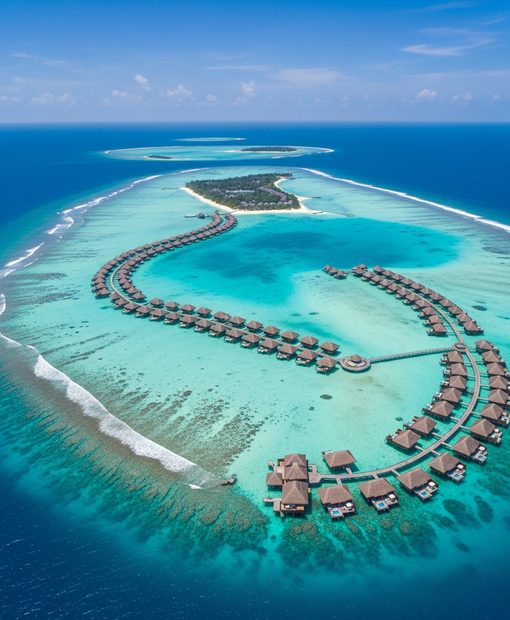

The Maldives splits your connectivity into two worlds: resort islands run expensive satellite Wi-Fi at €15-30 per day, while local islands and speedboat transfers rely on Dhiraagu and Ooredoo Maldives' 4G networks. A Maldivian eSIM keeps you online during atoll-hopping, seaplane rebookings, and guesthouse check-ins on Maafushi or Fulidhoo — places where resort Wi-Fi cannot reach and roaming bills climb fast.
Balanced use — social, navigation & light streaming
How many travelers?
Landing at Velana International in Malé, your eSIM connects to Dhiraagu or Ooredoo within seconds of wheels-down — no SIM-card kiosk, no passport photocopy, no counter queue. The QR code installs before you board your departure flight; the profile activates automatically when the phone sees a Maldivian tower.
If you are heading straight to a resort, the eSIM works during the speedboat or seaplane transfer, then goes quiet once you reach the island — resorts run their own satellite Wi-Fi, and your cellular plan cannot pierce that bubble.
If you are traveling the local-island route (Maafushi, Fulidhoo, Thinadhoo), the eSIM is your primary connection: guesthouses rarely offer free Wi-Fi, and when they do it is slow and shared across every room.
You will use the eSIM to book BML or MIB Pay transactions, check weather-dependent seaplane schedules, and message dive operators when plans shift. The network handoff between Dhiraagu and Ooredoo is invisible — your phone picks the stronger tower at each atoll, so you do not lock into one carrier's weak zone.
Hotspot works without extra fees, which matters if you are traveling with a partner or need to connect a laptop between excursions.
A physical SIM from the airport costs roughly the same but requires handing over your passport, waiting in line, and swapping the card back when you leave; the eSIM skips all three steps and deletes with a single tap when you are done.
Three reasons travelers pick esima for the Maldives. First: you pay local-market rates, not the roaming surcharge your home carrier adds for island coverage — important when resort Wi-Fi costs more per day than a week-long data plan.
Second: the eSIM switches between Dhiraagu and Ooredoo automatically, so you get the stronger signal whether you are in Malé or transferring through Ari Atoll.
Third: hotspot is enabled by default — critical if you are traveling with a partner whose phone does not support eSIM or if you need to tether a laptop for remote work between dives.
Your QR code lands in your inbox minutes after purchase.
Pay one upfront price — no surprise charges abroad.
Your physical SIM stays active for calls and texts.
Connect to top-rated local networks at full speed.
Real humans ready to help, any time zone, any day.
Scan once and you're online — no app, no SIM swap.
Our Maldives eSIMs run on the Dhiraagu and Ooredoo Maldives networks. Both carriers blanket the inhabited atolls with 4G — Malé, Hulhumalé, Addu City, and the guesthouse islands (Maafushi, Thoddoo, Dhigurah, Ukulhas) all have reliable LTE.
Resort islands typically rely on satellite backhaul for their own Wi-Fi, so your eSIM will not work on-island at a private resort, but it holds signal during speedboat transfers between Malé and outer atolls like Baa, Raa, and Lhaviyani — useful for connecting the moment you dock at a local island.
Mid-channel coverage drops to nothing on longer crossings, then returns near inhabited shores. Domestic seaplane routes with Trans Maldivian Airways and Manta Air have no in-flight connectivity; your eSIM reconnects when you land at the resort jetty or local island airstrip.
Network
Make sure your phone supports eSIM — most recent models do.
Pick a plan and pay securely. Your QR code arrives by email in minutes.
Scan the QR code, enable data roaming on arrival, and you're online.