WhatsApp +44 7367 063273
Jordan A.
Johannesburg, ZA · May 2026
Great connectivity
Overall a solid experience in Nepal. The eSIM worked well for Google Maps and chatting with friends back home. Just wish I had chosen the larger data plan for my photos!
42 verified reviews
Based on 42 reviews
Jordan A.
Johannesburg, ZA · May 2026
Overall a solid experience in Nepal. The eSIM worked well for Google Maps and chatting with friends back home. Just wish I had chosen the larger data plan for my photos!
Jordan A.
Johannesburg, ZA · Apr 2026
The eSIM worked seamlessly during my time in Nepal. I was able to share photos and keep up with group chats while trekking in the Himalayas. Only wish I had opted for the larger data plan, but overall, it was a solid experience. Support responded after a few hours, which made me a bit anxious, but they were helpful.
Marco D.
Rome, IT · Apr 2026
Esima was a lifesaver while traveling through Nepal! I could easily send messages and post updates on social media while visiting the ancient temples. The connection was reliable and I felt well-connected the entire trip 😊.
Hugo P.
Paris, FR · Jan 2026
I had a great experience using esima in Pokhara. The installation was straightforward, and I was able to backup my photos without any worries. Just wish I'd purchased the bigger data plan!
Daniel J.
Sydney, AU · Jan 2026
The esima eSIM was super easy to install as soon as I landed in Kathmandu. I loved being able to navigate the city without worrying about data. It really enhanced my travel experience!
Arjun K.
Bangalore, IN · Nov 2025
I couldn't believe how easy it was to get connected in Nepal! The eSIM made group chats and photo backups seamless. I definitely recommend esima to anyone heading there!
Hugo P.
Paris, FR · May 2025
I bought the esima eSIM for my trip to Nepal, and it was a game changer. Scanned the QR code as soon as I landed in Kathmandu, and I was connected instantly. I used Google Maps to navigate through the streets of Thamel and kept in touch with friends back home without any worries. Highly recommend this for anyone traveling to Nepal!
Anna V.
Amsterdam, NL · Apr 2025
I used esima during my trek in the Annapurna region, and it was a lifesaver! I was able to stay connected with my group and share photos in real-time. Setting it up was a breeze with the QR code. Highly recommend for anyone traveling to Nepal!
Typical home-carrier roaming
$10–$18
per day
Esima eSIM
$5.49
Flat rate
International roaming to Nepal from most carriers throttles after the first gigabyte or two, then either cuts you off or bills per-megabyte overage. Hotspot is often blocked entirely, so you cannot tether a laptop or share data with a travel partner.
The daily roaming fee buys you access but not speed — you still connect to the same Ncell or NTC towers, just at a markup. An eSIM gives you the local network at local-market pricing with no throttle and hotspot enabled by default.
That matters in Kathmandu when you need to run Pathao, eSewa and Google Maps simultaneously, or in Pokhara when your guesthouse Wi-Fi dies and you want to upload trek photos. The cost stays flat whether you use two gigabytes or twenty, so you can leave navigation running all day without watching a meter.
Different trip, same eSIM — here is how it lands for the most common visitors to Nepal.
You land in Kathmandu, install the eSIM in the arrivals hall, and spend two days acclimatizing in Thamel with live Pathao rides and eSewa payments. The flight to Lukla gets delayed; the Yeti Air app pings you with a new departure time. On the trek you have signal up to Namche for daily WhatsApp check-ins, then the eSIM goes dark and your offline maps take over.
Everest Base Camp trekker
You book a tandem flight from Sarangkot, and the operator sends a WhatsApp confirmation the night before with live weather updates. Your eSIM keeps Google Maps running for the rideshare to the launch site, then streams your GoPro footage to Instagram from Lakeside that evening. Hotspot lets your travel partner upload their photos without hunting for café Wi-Fi.
Pokhara paragliding visitor
You spend a week cycling between Swayambhunath, Pashupatinath, Boudhanath and Patan Durbar Square. Pathao gets you between sites faster than a taxi negotiation, eSewa pays for entry tickets and street snacks, and live navigation keeps you from getting lost in Thamel's alleys. The eSIM holds LTE the entire time, so you never need to ask a guesthouse for the Wi-Fi password.
Kathmandu Valley temple-hopper
The apps locals and travelers actually use — the ones that need real cell data, not just hotel Wi-Fi.

Pathao
Rideshare in Kathmandu and Pokhara, integrates eSewa and Khalti wallets

inDrive
Rideshare with fare negotiation, popular in Kathmandu

eSewa
Mobile wallet for payments, QR codes, bill pay and rideshare top-up

Khalti
Mobile wallet for payments and utility bills, backup to eSewa

Yeti Airlines app
Domestic flight booking and real-time status for Lukla and Pokhara routes

Maps.me
Offline maps for trekking routes and Kathmandu Valley navigation
~40MB per day for text and photos, ~120MB per day with voice calls to check trek logistics or flight status.
Maps
~100-150MB per day with live navigation in Kathmandu traffic; offline maps drop that to near zero on treks.
Rideshare
~30-50MB per day for Pathao or inDrive rides in Kathmandu, including live tracking and eSewa wallet confirmation.
Monsoon season from June through September brings heavy rain to Kathmandu Valley and the southern hills, which can degrade LTE signal quality and cause temporary tower outages in rural areas. Trekking routes above 3,000 meters are less affected by rain but remain signal-dead zones year-round.
October through May is peak trekking season — Everest Base Camp and Annapurna Circuit trails are crowded, but cellular coverage does not improve with foot traffic. Domestic flights to Lukla face the highest cancellation rates in monsoon and winter fog; live data access to airline apps becomes critical during those windows for real-time rebooking.
NTC has intermittent signal up to Namche Bazaar at 3,440 meters and patchy coverage in Tengboche. From Lobuche upward you will have no service on any carrier. Download offline maps and any trekking apps in Kathmandu or Lukla before starting the climb.
You will get LTE in Besisahar and Chame, patchy 3G in Manang on good days, then nothing above Thorong La. NTC occasionally reaches Manang but do not rely on it. Download your route maps and weather forecasts in Pokhara before the trek.
The main highway through Chitwan has LTE on both Ncell and NTC. Inside the park — Sauraha, the jungle lodges, the canoe routes — you drop to edge-of-network or lose signal entirely. Download any safari guides or bird checklists before entering.
Yes. NTC has slightly better coverage than Ncell in Lumbini and the surrounding Terai plains. You will hold LTE near the Maya Devi Temple and the main monastery zone. Expect 10-20 Mbps, enough for live maps and messaging.
You will only have signal for the first three to four days up to Namche, then nothing. Budget one to two gigabytes for that window — enough for daily WhatsApp check-ins, route confirmations and weather updates. The rest of the trek is offline.
Yes. WhatsApp voice and video calls work over LTE in Kathmandu, Pokhara and the main highway corridors. Call quality drops in hill towns and trekking routes where you fall back to 3G. Expect no service above 3,500 meters on any trail.
Google Maps or Apple Maps will consume around 100-150 megabytes per day if you leave navigation running for rideshare pickups and walking routes. Kathmandu traffic is dense, so the app recalculates frequently. Offline maps cut that to near zero.
Ncell is slightly faster in Thamel, Patan and the tourist zones, with typical LTE speeds around 15-25 Mbps. NTC is comparable in the city center and stronger in the northern valley and rural outskirts. The eSIM hands off automatically, so you get whichever is stronger at your location.
NTC has marginally better reach on high-altitude routes — it is the carrier that occasionally works in Namche Bazaar and Manang. Ncell thins out faster above 3,000 meters. Neither carrier provides reliable service above 3,500 meters on Everest Base Camp or Annapurna Circuit.
Yes. Pathao needs live data to match you with a driver, track the route and process payment through eSewa or Khalti. Both mobile wallets require an active data connection to confirm transactions, so keep your eSIM on during the ride.
Yes. inDrive operates the same way as Pathao — live data for driver matching, route tracking and wallet payments. If you pay cash the app still needs data to negotiate the fare and confirm pickup location.
Yes. eSewa is Nepal's dominant mobile wallet and requires live data to authorize payments, check balances and scan QR codes at shops. It integrates with Pathao, inDrive and most Kathmandu restaurants, so your eSIM keeps it functional on the move.
An eSIM installs in thirty seconds via QR code and you are online before leaving the arrivals hall. A physical SIM requires a passport photo, a deposit and a queue at the Ncell or NTC counter. Data allowances and coverage are identical; the eSIM just saves you twenty minutes and the deposit hassle.
Roaming often throttles after the first gigabyte and blocks hotspot, so you cannot share data with a trekking partner or tether a laptop at your Pokhara guesthouse. An eSIM gives you local-network pricing with no throttle and hotspot enabled. For treks the difference is small since you lose signal above Namche anyway, but in Kathmandu and Pokhara the eSIM is faster and cheaper.
Yes. Domestic flights to Tenzing-Hillary Airport in Lukla cancel frequently for weather. The Yeti Air and Tara Air apps let you check status and rebook in real time, but only with live data. Keep your eSIM active in Kathmandu so you can react without going back to the airline desk.
Going further than Nepal? These plans include Nepal plus everywhere in between.

Nepal lives on your phone — Pathao or inDrive to dodge Kathmandu traffic, eSewa to pay for momos at a Thamel stall, the Yeti Air app to rebook your Lukla flight when weather scrubs the morning departure. A Nepal travel eSIM connects you to Ncell or Nepal Telecom (NTC) the moment you land in Tribhuvan, so you skip the airport SIM counter and the NPR deposit dance.
Balanced use — social, navigation & light streaming
How many travelers?
Landing in Kathmandu with a Nepal eSIM means you scan the QR code in the arrivals hall, the profile installs in thirty seconds, and you are online before the taxi queue. No SIM-card deposit, no passport photocopy, no explaining your itinerary to a shop clerk.
The eSIM behaves like a local Ncell or NTC prepaid plan — you get the same towers, the same LTE bands, the same coverage map a Nepali subscriber sees. In Kathmandu and Pokhara you will hold a steady 4G connection for rideshare apps, mobile wallets and live navigation.
Outside the main cities coverage quality depends on altitude and terrain. The Terai plains and the Kathmandu-Pokhara highway corridor stay connected on LTE.
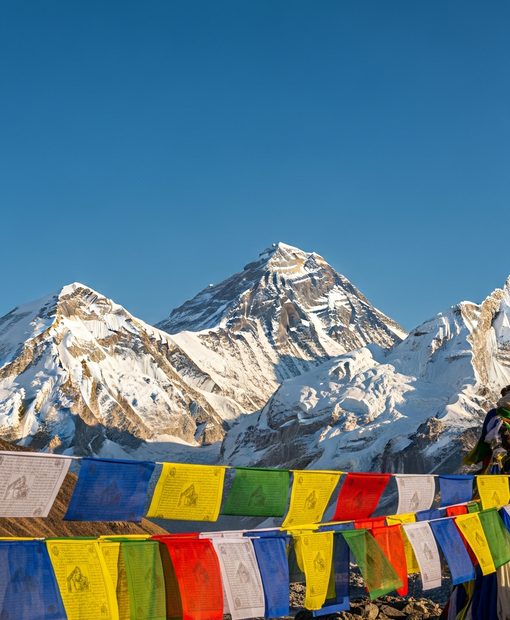
Hill towns like Bandipur or Gorkha drop to 3G or edge-of-network. High-altitude trekking routes — Everest Base Camp, Annapurna Circuit, Langtang — lose signal entirely above 3,500 meters.
The difference between this eSIM and a physical local SIM is installation speed and the fact that you keep your home number active in the second slot for two-factor codes. Data allowances, hotspot behavior and network priority are identical.
If you need to top up mid-trip most eSIM providers let you add a data bundle through their app over Wi-Fi; a physical SIM requires finding an Ncell or NTC shop and paying cash.
Three reasons travelers pick esima for Nepal. First: pricing mirrors local prepaid rates, not the roaming markup your home network charges for a Himalayan tower.
Second: the eSIM hands off between Ncell and NTC automatically — you get Ncell's stronger signal in Kathmandu Valley and Pokhara, NTC's better reach in Lumbini and the Terai plains.
Third: hotspot is enabled by default, so you can tether a laptop at your Lakeside guesthouse or share data with a trekking partner whose phone does not support eSIM. No throttling on the first few gigabytes like some local bundles.
Your QR code lands in your inbox minutes after purchase.
Pay one upfront price — no surprise charges abroad.
Your physical SIM stays active for calls and texts.
Connect to top-rated local networks at full speed.
Real humans ready to help, any time zone, any day.
Scan once and you're online — no app, no SIM swap.
Our Nepal eSIMs run on the Ncell and NTC networks. Ncell dominates Kathmandu Valley, Pokhara and the main tourist corridors — expect LTE in Thamel, Lakeside and Patan, with 4G speeds around 10-30 Mbps in normal conditions.
NTC has slightly better reach in Lumbini, the Terai plains and rural hill districts. Both carriers thin out fast above 3,000 meters.
Everest Base Camp treks get intermittent NTC signal up to Namche Bazaar at 3,440 meters, patchy in Tengboche, then nothing from Lobuche upward. Annapurna Circuit has service in Manang on good days, but expect dead zones above Thorong La.
Chitwan National Park has LTE along the highway but drops to edge-of-network inside the park. Download offline maps in Kathmandu or Pokhara before any trek.
Network
Make sure your phone supports eSIM — most recent models do.
Pick a plan and pay securely. Your QR code arrives by email in minutes.
Scan the QR code, enable data roaming on arrival, and you're online.