WhatsApp +44 7367 063273
Niamh F.
Galway, IE · Jun 2026
Seamless experience in Singapore
Absolutely loved using esima! The QR code installation was a breeze, and I had 5G speeds while navigating the city. Perfect for sharing photos and staying connected!
136 verified reviews
Based on 136 reviews
Niamh F.
Galway, IE · Jun 2026
Absolutely loved using esima! The QR code installation was a breeze, and I had 5G speeds while navigating the city. Perfect for sharing photos and staying connected!
Liam C.
Vancouver, CA · Jun 2026
I loved how user-friendly the installation was! The eSIM worked perfectly while I was out and about in Singapore. No more dealing with physical SIMs - this is the future!
Jessica L.
New York, US · Jun 2026
Overall, esima worked well during my trip to Singapore. I had a bit of trouble scanning the QR code initially, but their customer service was quick to help. Once I got it set up, I enjoyed fast internet around the city, perfect for navigation and social media.
Marco D.
Rome, IT · Jun 2026
The eSIM worked flawlessly the second I landed at Changi Airport. I scanned the QR code, and within minutes, I was browsing the web on 5G! Highly recommend for anyone visiting Singapore.
Wei L.
Singapore, SG · Jun 2026
Used esima while exploring Singapore, and the connection was reliable most of the time. Some slower speeds in the Botanic Gardens, but overall a great experience. Easy to set up!
Michael R.
Los Angeles, US · May 2026
As soon as I arrived, I scanned the QR code and was up and running in less than 30 seconds! The eSIM allowed me to stay connected while wandering through Gardens by the Bay and even posting my photos in real time. Definitely a game changer for my travels!
Lucas O.
São Paulo, BR · May 2026
I loved using esima for my trip to Singapore! The 5G speed was incredible, allowing me to navigate the city seamlessly. Installation was quick, and I was online in less than a minute. No roaming fees made this an absolute win!
Priya S.
Mumbai, IN · May 2026
I can't recommend esima highly enough! The installation was a breeze—just a quick scan of the QR code at the airport. I had no issues streaming Netflix while enjoying the skyline views of Marina Bay. Truly a lifesaver!
Typical home-carrier roaming
$10–$18
per day
Esima eSIM
$3.43
Flat rate
Most international carriers charge a flat daily fee for roaming in Singapore, typically unlocking a small data allowance — often one or two gigabytes — before throttling speed to near-unusable levels or cutting you off entirely until the next calendar day. Hotspot and tethering are frequently blocked or cost extra.
The daily charge resets at midnight in your home time zone, not Singapore time, so a long-haul flight can burn two roaming days before you leave the airport. An eSIM gives you a fixed data pool at local-market pricing, no daily reset, no throttle threshold, and hotspot enabled by default.
If you run low mid-trip, you top up from the app in five seconds rather than hunting for a carrier store or waiting for your home network's roaming bundle to refresh. For a week-long stay, the eSIM typically costs less than three days of roaming and delivers five to ten times the usable data.
Different trip, same eSIM — here is how it lands for the most common visitors to Singapore.
You have a twelve-hour layover at Changi and a client meeting in the city. The eSIM activates as you clear immigration, so you book a Grab to the CBD, join the video call from a co-working space on LTE, and navigate back to the airport without hunting for Wi-Fi passwords or burning roaming credit on a half-day visit.
Business stopover
You spend the week eating your way through Lau Pa Sat, Maxwell Food Centre and Tiong Bahru Market. The eSIM keeps Google Maps live for walking directions, lets you pay with GrabPay at cashless stalls, and uploads food photos to Instagram between bites. SimplyGo on the MRT works via NFC, but the TransitLink app needs data to show your fare cap.
Hawker-centre explorer
You take the kids to Universal Studios and the S.E.A. Aquarium on Sentosa. The eSIM holds signal across the island, the cable car and inside the attractions. You share hotspot with your partner's phone for real-time photo backups, check Grab wait times for the ride back, and stream a movie on the MRT home without worrying about a data cap.
Family theme-park trip
The apps locals and travelers actually use — the ones that need real cell data, not just hotel Wi-Fi.

Grab
Ride-hailing, food delivery and cashless payment

TransitLink
MRT and bus fare cap tracking, trip history

GrabPay
QR-code payment at hawker centres and shops

Singtel Dash
Mobile wallet for cashless payments
MyTransport.SG
Real-time bus arrival and MRT service alerts
Google Maps
Walking and MRT navigation across the island
~40MB per day for text and photo chats, ~120MB per day with voice calls, ~250MB per day with video calls.
Maps
~12MB per hour for live turn-by-turn navigation in Singapore; offline maps cut that to ~3MB per hour for route recalculation only.
Rideshare
~8MB per Grab ride for driver matching, real-time tracking and route updates; ~15MB per day if you take three to four rides.
Singtel and StarHub have continuous LTE coverage on all MRT lines, including inside tunnels. M1 can have brief gaps on the Circle Line between Botanic Gardens and Caldecott stations, but signal returns at each platform. Messages and app notifications may queue during the gap and deliver when you surface.
A typical week uses three to five gigabytes if you rely on Grab for transport, stream music on the MRT, and share photos to WhatsApp daily. Add another gigabyte if you use Google Maps navigation heavily or make frequent video calls. Offline maps and hotel Wi-Fi for uploads can halve that total.
Yes. Sentosa has full LTE coverage from Singtel, StarHub and M1 across Universal Studios, the beaches, Resorts World and the cable car. The Southern Ridges hiking trail between Mount Faber and Kent Ridge can see brief drops to 3G on M1, but the other two carriers hold LTE throughout.
Yes. Grab requires live data for driver matching, real-time tracking and order updates. The app works on all three Singapore networks. If you lose signal briefly — for example, in an MRT tunnel on M1 — the app will reconnect and resume tracking when signal returns at the next station.
Yes. Changi Airport has full 5G coverage from Singtel across all terminals, the Jewel attraction, transit areas and the connecting Skytrain. StarHub and M1 deliver strong LTE. The eSIM registers on the network as soon as your plane lands, so you are online before you reach immigration.
Singtel has the widest 5G footprint, including full coverage in MRT tunnels and Changi Airport. StarHub also covers the MRT underground and delivers strong LTE across the city. The eSIM hands off between both networks automatically, so you get whichever is stronger at your location. In practice, Singtel wins more often in dense urban areas and transit hubs.
SimplyGo itself does not need the eSIM — it uses NFC from your credit card or mobile wallet. But the TransitLink app, which shows your daily fare cap and trip history, requires live data to sync. Install the app and check your balance over the eSIM connection or hotel Wi-Fi.
Yes. WhatsApp voice and video calls work over the data connection. A ten-minute voice call uses roughly five megabytes; a ten-minute video call uses twenty to thirty megabytes. All three Singapore carriers allow VoIP without restriction.
Yes. Both locations have full LTE coverage from Singtel, StarHub and M1. The Cloud Forest and Flower Dome conservatories inside Gardens by the Bay have strong indoor signal. The Botanic Gardens can see brief slowdowns during peak weekend crowds, but coverage itself is solid.
Live navigation with turn-by-turn directions uses roughly ten to fifteen megabytes per hour. Searching for nearby restaurants or attractions adds another five megabytes per session. Download an offline map of Singapore before you arrive to cut data use by half and speed up load times.
Singtel has continuous LTE in all MRT tunnels. M1 can have brief gaps on the Circle Line between Botanic Gardens and Caldecott, where signal drops for thirty to sixty seconds. If you rely on real-time app updates during your commute, Singtel is the safer bet, but the eSIM will hand off to Singtel automatically if M1 weakens.
Yes. GrabPay needs live data to generate payment QR codes and confirm transactions. The app works on all three Singapore networks. Many hawker centres and small shops now accept GrabPay, so keeping the eSIM active makes cashless payment faster than hunting for an ATM.
An airport SIM from Singtel or StarHub costs roughly the same per gigabyte but requires a queue, a passport photocopy, and a registration form. The eSIM installs before you fly, activates the moment you land, and lets you top up from the app if you run low. If you need a local Singapore number for SMS verification, the airport SIM is the only option — the eSIM is data-only.
Yes. Hotspot and tethering are enabled by default on all our Singapore eSIM plans, with no extra charge and no throttle on the first few gigabytes. Useful if you are travelling with a work laptop or a companion whose phone does not support eSIM.
Yes. Jurong, including Jurong East MRT interchange, Jurong Bird Park and the industrial estates, has full LTE coverage from all three carriers. Singtel and StarHub deliver 5G in the busier commercial zones. Signal quality matches the rest of the island.
Going further than Singapore? These plans include Singapore plus everywhere in between.
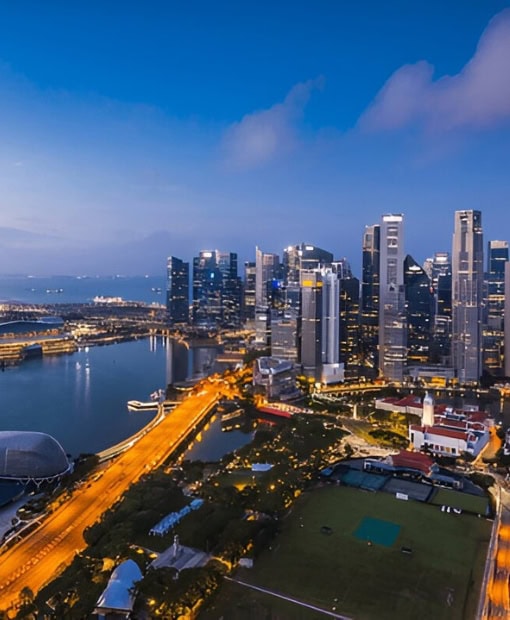

Singapore runs on apps — Grab for taxis and food, SimplyGo for contactless MRT fare taps via Apple Pay, the TransitLink app to check your daily fare cap, Singtel Dash or GrabPay for hawker-centre cashless stalls. A Singapore eSIM connects you to Singtel, StarHub or M1 the moment you clear immigration at Changi, so you skip the airport SIM counter, the passport photocopy, and the roaming bill that charges you twice what a local prepaid customer pays.
Balanced use — social, navigation & light streaming
How many travelers?
You install the eSIM before you board — scan the QR code in the esima app, toggle the new line to active, leave your home SIM on for calls if you want.
When your plane touches down at Changi, the eSIM registers on whichever of the three Singapore networks has the strongest signal at that moment, and you are online before the seatbelt sign goes off. No queue at the Singtel or StarHub counter, no passport scan, no cash deposit.
The profile stays dormant until first connection, so you can install it days or weeks ahead without burning validity. Singapore's compact geography means handoff between carriers is fast — the eSIM will switch from Singtel to M1 mid-journey if signal strength tips, though in practice Singtel's 5G footprint keeps most sessions stable.
Physical local SIMs from 7-Eleven or Changi Airport kiosks cost roughly the same per gigabyte but require a passport photocopy, a registration form, and a trip to a top-up machine when you run low. The eSIM skips all three steps and lets you add data from the app if your original bundle runs short.
Hotspot mode works without extra charges, so you can share connection with a travel partner's device or a work laptop.
One edge case: if you need a local Singapore number for SMS verification (some bank apps, a few government portals), the eSIM is data-only — you would need a physical SIM or a virtual number service for that narrow use.
Three reasons travellers pick esima for Singapore. First: pricing mirrors local prepaid rates, not the roaming premium your home carrier layers on for foreign towers.
Second: the eSIM hands off between Singtel, StarHub and M1 automatically, so you get the strongest signal in your hotel lobby rather than one carrier's weak spot. Third: hotspot and tethering are enabled by default — useful if you are travelling with a laptop, a tablet, or a companion whose phone does not support eSIM. No throttling on the first few gigabytes like some local carrier bundles impose.
Your QR code lands in your inbox minutes after purchase.
Pay one upfront price — no surprise charges abroad.
Your physical SIM stays active for calls and texts.
Connect to top-rated local networks at full speed.
Real humans ready to help, any time zone, any day.
Scan once and you're online — no app, no SIM swap.
Our Singapore eSIMs run on the Singtel, StarHub and M1 networks. Singtel operates the most extensive 5G standalone deployment across the island, including full coverage inside all Changi Airport terminals and across the MRT underground network.
StarHub also delivers continuous LTE in MRT tunnels on all lines. M1 covers the city well but can drop briefly to 3G on the Southern Ridges hiking trail between Mount Faber and Kent Ridge, and has short gaps on the Circle Line between Botanic Gardens and Caldecott stations.
Sentosa Island, Marina Bay, Gardens by the Bay and Jurong all have full LTE from all three carriers. Singapore is small and densely built — true dead zones are rare, limited to a few basement carparks and the deepest recesses of older shopping centres.
Network
Make sure your phone supports eSIM — most recent models do.
Pick a plan and pay securely. Your QR code arrives by email in minutes.
Scan the QR code, enable data roaming on arrival, and you're online.