 WhatsApp +44 7367 063273
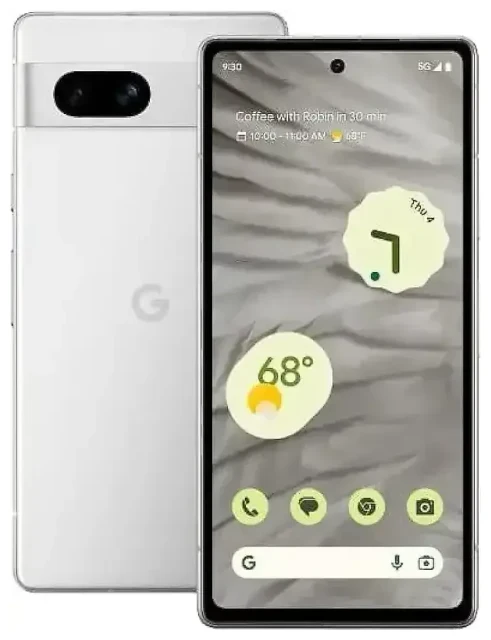
Does the Google Pixel 7a support eSIM?
Yes, the Google Pixel 7a supports eSIM. All variants of the Pixel 7a—regardless of where you purchased it—include eSIM functionality built into the device. This applies to models sold in North America, Europe, Asia, and other markets worldwide.
Google Pixel 7a eSIM compatibility
The Pixel 7a supports dual SIM operation, meaning you can use one eSIM and one physical nano-SIM simultaneously. This setup lets you maintain two separate phone numbers or plans on a single device—useful if you want to keep your home number active while using a local data plan abroad.
The device does not support dual eSIM (two eSIMs active at once). You're limited to one eSIM profile active alongside the physical SIM card slot. However, you can store multiple eSIM profiles on the Pixel 7a and switch between them in Settings whenever needed, even if only one eSIM can be active at a time.
Pixel 7a dual SIM capabilities
When you run dual SIM on the Pixel 7a, you can designate which line handles mobile data, calls, and text messages. This flexibility means you can route data through a travel eSIM while still receiving calls and texts on your primary physical SIM—no need to swap cards or carry a second phone.
How to set up an eSIM on the Google Pixel 7a
Setting up an eSIM on your Pixel 7a takes about 60 seconds once you have your QR code from your carrier or eSIM provider. You'll need a steady internet connection—Wi-Fi is easiest—to download the eSIM profile to your device.
Pixel 7a eSIM setup steps
- Open Settings on your Pixel 7a.
- Tap Network & internet.
- Tap the + icon next to SIMs (or tap Add more if you see that option).
- Select Download a SIM instead? at the bottom of the screen.
- Tap Next, then scan the QR code provided by your eSIM provider using your camera.
- The eSIM profile will download and install automatically. This usually takes 10–30 seconds.
- Once installed, you'll be prompted to label the line (for example, "Travel" or "Work"). Choose a name that helps you identify it easily.
- Set your preferences for which SIM handles calls, texts, and mobile data. You can change these anytime in Settings > Network & internet > SIMs.
Alternative activation methods
If your eSIM provider supplies an activation code instead of a QR code, choose Enter it manually in step 5 above and paste the code. Some carriers also offer app-based activation—download their app and follow the in-app instructions to install the eSIM profile directly.
Using a travel eSIM on the Google Pixel 7a
A travel eSIM is the easiest way to get mobile data abroad without paying roaming fees on your home plan. You buy a data-only eSIM for your destination country or region, install it on your Pixel 7a before you fly, and activate it when you land. Your phone connects to a local network immediately, and you avoid bill shock.
Why travel eSIMs work well on the Pixel 7a
Because the Pixel 7a supports dual SIM, you can keep your home physical SIM in the tray for calls and two-factor authentication texts while routing all data through the travel eSIM. This setup means friends, family, and your bank can still reach you on your regular number, but you're not paying international data rates.
Install your travel eSIM while you're still at home and connected to Wi-Fi. Most eSIM profiles activate automatically when they detect the destination network, so you'll have data the moment you step off the plane. You can browse eSIM plans for over 200 countries and regions, comparing coverage and data allowances to find the right fit for your trip.
Managing multiple eSIM profiles
If you travel frequently, you can store several eSIM profiles on your Pixel 7a—one for Europe, another for Asia, and so on. Only one eSIM can be active at a time (alongside your physical SIM), but switching between stored profiles takes seconds in Settings. This means you don't need to buy a new eSIM for every trip if your previous plan still has validity or data remaining.
Tips & troubleshooting
Most Pixel 7a eSIM setups go smoothly, but a few common issues trip people up. Here's how to avoid them and what to do if something doesn't work as expected.
Turn on data roaming for your eSIM line
After installing a travel eSIM, go to Settings > Network & internet > SIMs, tap your eSIM line, and make sure Roaming is toggled on. Travel eSIMs are designed to roam on partner networks abroad, so "roaming" in this context doesn't mean extra charges—it's how the eSIM connects. If roaming is off, your eSIM won't get data.
Keep your home SIM active for calls and texts
In dual SIM mode, set your physical SIM as the default for calls and SMS, and your travel eSIM as the default for mobile data. This way, you receive two-factor authentication codes and phone calls on your home number without incurring data roaming fees. You configure these defaults during eSIM setup or later in the SIM settings menu.
Fix an eSIM that won't activate
If your QR code won't scan, check that your camera lens is clean and the QR code is displayed at full brightness on another screen (not printed). If scanning still fails, choose the manual entry option and type in the activation code instead. If the eSIM installs but won't connect, restart your Pixel 7a, confirm that the correct SIM is set for mobile data, and double-check that roaming is enabled for that line.
If you're still stuck, your eSIM provider's support team can verify that the profile was issued correctly. You can also check another device's eSIM compatibility if you're troubleshooting across multiple phones, or visit eSIM setup help for detailed walkthroughs.








