 WhatsApp +44 7367 063273
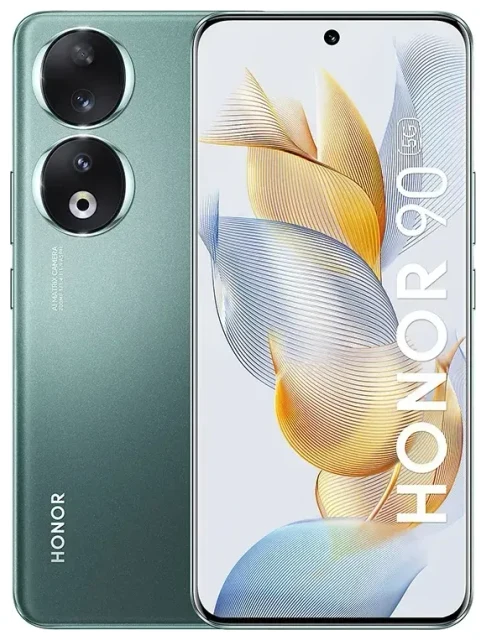
Does the Honor 90 support eSIM?
Honor 90 eSIM compatibility
No, the Honor 90 does not support eSIM technology. Honor released this device with support only for physical nano-SIM cards. This applies to all regional variants and model numbers of the Honor 90 worldwide—there are no exceptions.
The Honor 90 does offer dual-SIM functionality, but both slots require physical nano-SIM cards. You can use two carrier accounts simultaneously (one for data, one for calls, or two separate numbers), but you'll need to insert physical SIMs rather than downloading a digital profile.
Other Honor models and eSIM
If you're researching Honor eSIM support more broadly: Honor has been slow to adopt eSIM across its product line. The Honor 90 Lite also lacks eSIM support, as do the Honor X9b and Honor X9c—all of these models rely exclusively on physical SIM cards. If eSIM is important for your use case, you'll need to check another device's eSIM compatibility from a manufacturer that has adopted the standard more widely.
Your options without eSIM on the Honor 90
Using physical SIM cards on the Honor 90
Since the Honor 90 doesn't support eSIM, you'll rely on traditional nano-SIM cards. The device includes a dual-SIM tray that accepts two physical cards, giving you flexibility to separate work and personal lines or use local and home carriers at the same time.
Here's how to set up your physical SIM:
- Power off your Honor 90 completely.
- Locate the SIM tray on the side of the device and eject it using the included tool or a paperclip.
- Place your nano-SIM card in the tray, aligning the notched corner correctly.
- If using dual SIM, insert a second nano-SIM in the second slot.
- Reinsert the tray firmly into the device.
- Power on the phone and wait for the carrier signal to appear.
- Go to Settings > Mobile network > SIM management to configure which SIM handles data, calls, and messages.
Consider an eSIM-capable alternative
If you specifically need eSIM functionality—perhaps for easy carrier switching, travel flexibility, or managing multiple profiles without swapping cards—you'll need to choose a different device. Many flagship phones from Apple, Samsung, Google, and other manufacturers now include eSIM as standard. The lack of Honor eSIM support across the Honor 90, Honor 90 Lite, Honor X9c, and Honor X9b means you'll want to look outside the Honor lineup if this technology is a priority.
Staying connected abroad with the Honor 90
Travel SIM options for the Honor 90
Without eSIM capability, your international connectivity options on the Honor 90 involve physical solutions. You can purchase a local prepaid SIM at your destination airport or from a mobile shop, or order an international travel SIM card online before departure. These physical cards slip into your Honor 90's SIM tray and provide local rates without roaming fees.
The advantage: you avoid expensive roaming charges from your home carrier. The downside: you need to physically obtain and swap SIM cards, and you may lose access to your home number for calls and texts while the travel SIM is active (unless you use the second SIM slot for your home carrier and manage both lines).
Why eSIM would make travel easier
Many travelers prefer eSIM-capable devices because you can browse eSIM plans online, purchase a data plan for your destination, and install it digitally in minutes—no hunting for a SIM vendor, no tiny cards to lose, no ejector tools needed. You can also keep your home SIM active for receiving verification codes and calls while the eSIM handles data. Unfortunately, the Honor 90's hardware doesn't include the embedded SIM chip needed for this convenience, so you're limited to traditional SIM cards when traveling.
Tips & troubleshooting
Managing dual physical SIMs on the Honor 90
Since you have two physical SIM slots, designate one for data and one for calls in Settings > Mobile network > SIM management. When traveling, insert a local SIM for data in one slot and keep your home SIM in the other for incoming calls and two-factor authentication messages. Make sure to enable the correct SIM for mobile data in the settings menu—the Honor 90 won't automatically switch data between lines.
What if you need to switch carriers frequently
The Honor 90's reliance on physical SIM cards means swapping carriers requires ejecting the tray and changing cards. Keep your SIM ejector tool handy, and store unused SIM cards in a safe place (they're easy to lose). If you regularly switch between carriers—say, between countries or for work versus personal use—the lack of eSIM on the Honor 90 makes this process more cumbersome than on devices that let you store multiple carrier profiles digitally.
Network and data connectivity issues
If your Honor 90 isn't connecting to mobile data after inserting a SIM, verify the card is seated properly in the tray and that you've selected the correct SIM for data in settings. Restart the device, then check that your APN settings match your carrier's requirements (usually configured automatically, but you can add them manually in Settings > Mobile network > Access Point Names). If problems persist, contact your carrier to confirm the SIM is activated and provisioned correctly. For additional guidance, visit eSIM setup help—though the Honor 90 doesn't use eSIM, the troubleshooting principles for connectivity apply to physical SIMs as well.








