 WhatsApp +44 7367 063273
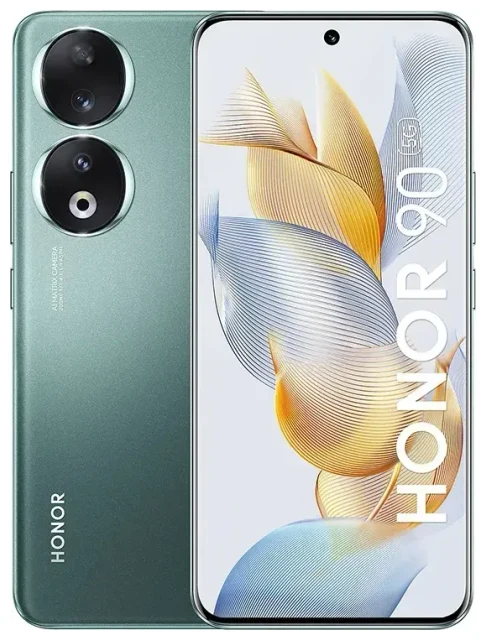
Does the Honor Honor 90 support eSIM?
No, the Honor Honor 90 does not support eSIM. This device relies exclusively on physical nano-SIM cards for cellular connectivity across all regional variants and markets where it's sold.
Honor Honor 90 eSIM compatibility
The Honor Honor 90 launched without eSIM functionality. Honor has not enabled eSIM technology in this model, regardless of where you purchased it or which storage configuration you chose. If you need eSIM support for travel or dual-line use, you'll need to consider a different device.
Dual SIM configuration on the Honor Honor 90
While the Honor Honor 90 doesn't offer eSIM, it does support dual physical SIM cards. You can insert two nano-SIM cards simultaneously, allowing you to use two phone numbers or separate work and personal lines. Both SIM slots accept standard nano-SIM cards, and you can configure which SIM handles calls, messages, and mobile data through the device settings.
Your options without eSIM on the Honor Honor 90
Since the Honor Honor 90 doesn't support eSIM, you'll work exclusively with physical SIM cards. Here's how to manage connectivity on this device:
Using physical SIM cards on the Honor Honor 90
- Locate the SIM tray on the side of your Honor Honor 90 and use the ejector tool to open it.
- Place one or two nano-SIM cards in the tray slots, ensuring the gold contacts face down and the cut corner aligns correctly.
- Reinsert the tray firmly until it clicks into place.
- Power on your device and wait for the SIM cards to register with your carrier networks.
- Go to Settings > Mobile network > SIM management to label each SIM and set your default line for calls, messages, and data.
- If using a new carrier, you may need to configure APN settings under Settings > Mobile network > Access Point Names.
Consider eSIM-capable alternatives
If you specifically need eSIM functionality, you'll want to check another device's eSIM compatibility before purchasing. While Honor phones like the Honor 90 don't currently support eSIM, other manufacturers including Apple, Google, and Samsung offer extensive eSIM support across their lineups. Models like recent iPhones, Google Pixel devices, and Samsung Galaxy flagships all include eSIM alongside physical SIM slots.
Staying connected abroad with the Honor Honor 90
Without eSIM capability, your options for international connectivity on the Honor Honor 90 involve physical SIM cards. Here's how to get data abroad without facing expensive roaming charges.
Travel SIM cards for the Honor Honor 90
Purchase a local physical SIM card when you arrive at your destination, or order a prepaid travel SIM card before departure. You can insert it into your second SIM slot while keeping your home SIM active in the first slot. This lets you access affordable local data rates while still receiving calls and texts on your primary number. Configure your Honor Honor 90 to use the travel SIM for mobile data and your home SIM for calls in the dual-SIM settings menu.
Why eSIM would have helped
If the Honor Honor 90 supported eSIM, you could instantly browse eSIM plans and install a data plan digitally before your flight, eliminating the need to find a SIM vendor at the airport or swap tiny cards. Devices with eSIM let you download multiple carrier profiles and switch between them in settings. Since the Honor Honor 90 lacks this feature, you'll need to plan ahead and either activate international roaming with your home carrier or obtain a physical travel SIM.
Tips & troubleshooting
Managing dual physical SIMs effectively
Make the most of your Honor Honor 90's dual-SIM capability by clearly labeling each line in settings—use names like "Personal" and "Travel" so you always know which SIM you're using. When traveling, set your travel SIM as the default for mobile data while keeping your home SIM active for incoming calls and two-factor authentication codes. You can toggle data roaming on or off for each SIM independently under Settings > Mobile network > SIM management.
Physical SIM troubleshooting
If your Honor Honor 90 doesn't recognize a SIM card, remove and reinsert it, ensuring it's seated properly with the correct orientation. Check that the SIM isn't damaged and that your carrier hasn't locked the account. If you're using a brand-new SIM, you may need to activate it through your carrier's website or app first. For persistent issues, reach out to your mobile carrier's support team—most SIM recognition problems stem from activation or network registration rather than hardware faults.
Do Honor phones support eSIM?
Honor's current phone lineup, including the Honor 90, Honor 90 Lite, Honor X9c, and Honor X9d, does not support eSIM technology. The company has not yet implemented eSIM in any of their smartphone models available in major markets. If you need eSIM support, verify compatibility before purchasing any Honor device, as this feature remains absent across their product range. For guaranteed eSIM access, consider manufacturers with established eSIM support like Apple, Google, or Samsung, and always get eSIM setup help if you choose an eSIM-capable device.








