 WhatsApp +44 7367 063273
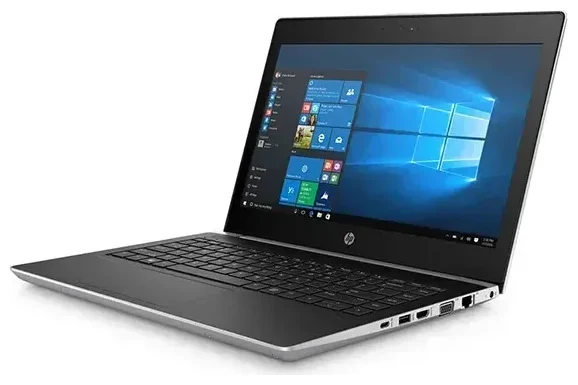
Does the HP Probook G5 support eSIM?
HP Probook G5 eSIM compatibility
No, the HP Probook G5 does not support eSIM. This business laptop series was designed primarily for Wi-Fi connectivity and does not include embedded cellular modem options. The HP ProBook G5 line—which includes models like the ProBook 440 G5, 450 G5, and 650 G5—relies on traditional wired Ethernet and Wi-Fi connections for network access.
If you need cellular connectivity on an HP laptop, you'll need to look at different product lines. HP's EliteBook series and the HP Elite Dragonfly lineup include models with integrated LTE or 5G modems that support eSIM. The HP EliteBook G5 and later generations offer optional WWAN (wireless wide area network) configurations with eSIM support, but these are distinct from the ProBook series.
HP laptops with eSIM support
While the HP Probook G5 doesn't offer eSIM, HP does manufacture several laptop models with built-in cellular connectivity. The HP Elite Dragonfly G2, G3, and G4 include eSIM-capable 4G LTE and 5G modems. The HP EliteBook 800 series (G8 and newer) and HP EliteBook x360 models also offer optional WWAN with eSIM. When shopping for an HP laptop with 5G sim card slot or eSIM capability, check the spec sheet for "WWAN" or "5G" options—these configurations typically include eSIM support.
Your connectivity options without eSIM on the HP Probook G5
Staying connected on the HP Probook G5
Since the HP Probook G5 lacks cellular connectivity, you have several alternatives for internet access when you're away from home or office networks:
- Connect to available Wi-Fi networks at hotels, cafes, airports, or co-working spaces where you're traveling or working remotely.
- Use a mobile hotspot from your smartphone by enabling tethering in your phone's settings and connecting your laptop to that Wi-Fi network.
- Purchase a portable Wi-Fi hotspot device (sometimes called a MiFi) that accepts a physical SIM card and creates a Wi-Fi network for your laptop.
- Use a USB cellular modem dongle that plugs into your laptop's USB port and accepts a standard nano-SIM card for mobile data.
- Consider upgrading to an HP laptop with built-in WWAN and eSIM support if you frequently need cellular connectivity on the go.
Using your smartphone as a hotspot
The most practical solution for most users is smartphone tethering. If your phone supports eSIM and you're looking for affordable international data, you can browse eSIM plans for your phone and then share that connection with your HP Probook G5. This approach gives you the flexibility of eSIM travel data without needing a laptop that has native eSIM support.
Traveling abroad with the HP Probook G5
Internet access while traveling
When traveling internationally with your HP Probook G5, you'll need to plan your connectivity strategy since the laptop doesn't have cellular capabilities. Your best options include relying on hotel and cafe Wi-Fi, using your smartphone as a mobile hotspot, or purchasing a local portable hotspot device at your destination.
For reliable mobile data while abroad, consider setting up a travel eSIM on your smartphone before you depart. Install the eSIM profile while you still have Wi-Fi at home, and it will activate when you land. You can then share that connection with your HP Probook G5 through your phone's hotspot feature. This eliminates expensive roaming charges and gives your laptop internet access wherever your phone has coverage.
Which HP laptops offer eSIM for travel
If you frequently travel and need direct laptop connectivity without relying on your phone, consider HP's business laptops with integrated eSIM. The HP Elite Dragonfly series and HP EliteBook models with WWAN options let you install a travel eSIM directly on the laptop. These HP 5G laptop and LTE-enabled models connect independently to cellular networks, which is convenient when you need to work in areas without reliable Wi-Fi or when you want to avoid the battery drain of running a phone hotspot all day.
Tips and troubleshooting
Confirming laptop eSIM compatibility
When shopping for a new laptop or checking whether your current device supports eSIM, look for "WWAN," "LTE," "5G," or "cellular" in the technical specifications. Not all configurations of a laptop model include cellular capability—it's often an optional upgrade at purchase time. Check the specific SKU or model number against the manufacturer's spec sheet. If you need to check another device's eSIM compatibility, verify both that the device has a cellular modem and that it specifically supports eSIM rather than only physical SIM cards.
Maximizing hotspot performance
When using your phone as a hotspot for your HP Probook G5, keep the devices close together for the strongest Wi-Fi signal. Enable data-saving features in your laptop's operating system and browser to reduce bandwidth consumption. Close unnecessary applications and disable automatic updates while tethered. If your phone supports 5GHz Wi-Fi hotspot mode, enable it for faster speeds compared to 2.4GHz. Monitor your phone's battery level—tethering drains power quickly, so keep a charger handy.
USB cellular modems as an alternative
If you need a dedicated cellular connection for your HP Probook G5, USB cellular modems offer a practical solution. These dongles accept a standard nano-SIM card (not eSIM) and plug directly into your laptop's USB port. They provide 4G LTE or 5G speeds depending on the model. While they don't offer the elegance of built-in eSIM, they work with any laptop and don't drain your phone's battery like tethering does. When traveling, you can swap in local SIM cards for affordable data rates.








