 WhatsApp +44 7367 063273
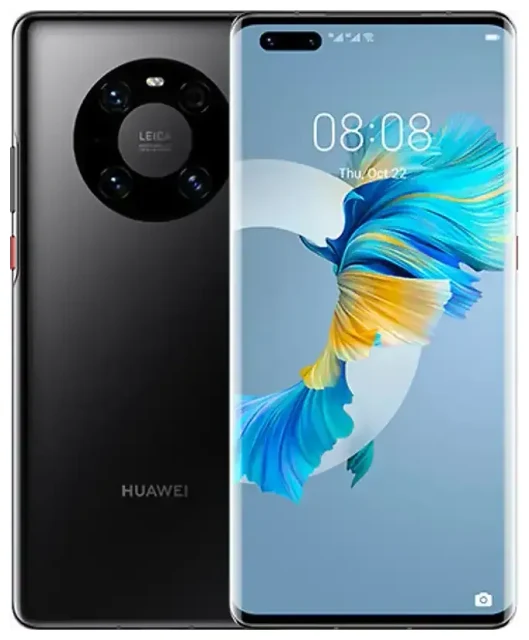
Does the Huawei Mate 40 Pro support eSIM?
Huawei Mate 40 Pro eSIM compatibility
The Huawei Mate 40 Pro supports eSIM in some regional variants, but not universally. Certain models sold in Europe and select Asian markets include eSIM functionality, while many variants—particularly those distributed in China and other regions—rely exclusively on physical nano-SIM cards. This fragmentation means you need to verify your specific model before assuming eSIM capability.
If your Huawei Mate 40 Pro does include eSIM, it supports dual SIM operation: one eSIM plus one physical nano-SIM slot, letting you run two numbers simultaneously. This is useful for separating work and personal lines or adding a local data plan when you travel. However, because Huawei's eSIM rollout on the Mate 40 Pro was limited and region-dependent, you should confirm compatibility by checking your device's specification sheet or looking in Settings > Mobile network > SIM management. If you see an option to add an eSIM or cellular plan, your variant supports it. If not, your model is physical-SIM-only.
Which Huawei Mate 40 Pro models have eSIM
Huawei did not publish a comprehensive public list of exactly which Mate 40 Pro SKUs carry eSIM, and the feature's availability varied by carrier partnerships and local regulations. European units and some models sold through specific carriers in the Middle East and Asia-Pacific have been confirmed with eSIM support. If you purchased your Huawei Mate 40 Pro unlocked or through a carrier outside these regions, double-check the manufacturer's official spec page or contact Huawei support to confirm. Do not assume eSIM is present based solely on the "Mate 40 Pro" name—verify your individual unit.
How to set up an eSIM on the Huawei Mate 40 Pro
Set up an eSIM in Settings
If your Huawei Mate 40 Pro variant includes eSIM, activation typically takes about 60 seconds. You'll receive a QR code from your eSIM provider—either by email or in your account dashboard—and scan it directly on the device. Here's the step-by-step process:
- Open Settings and tap Mobile network.
- Tap SIM management, then select Add eSIM or Add cellular plan.
- When prompted, tap Scan QR code and point your camera at the QR code provided by your eSIM carrier.
- The Mate 40 Pro will download the eSIM profile and prompt you to label the line (for example, "Travel" or "Work").
- Choose which SIM to use for mobile data, calls, and messages in the SIM management menu.
- Toggle on Mobile data and, if traveling, enable Data roaming for the eSIM line.
The eSIM activates immediately once the profile downloads. You can switch between your physical SIM and eSIM for data at any time in SIM management, making it easy to control which line handles your internet connection.
Using a travel eSIM on the Huawei Mate 40 Pro
Get roaming-free data abroad
A travel eSIM is the simplest way to stay connected internationally without paying roaming fees. Instead of hunting for a physical SIM card at the airport or dealing with your home carrier's expensive roaming rates, you install a data-only eSIM before you fly. Once you land, the eSIM connects to a local network automatically, giving you affordable data for maps, messaging, and email.
Install the travel eSIM while you're still at home and connected to Wi-Fi—this ensures the profile is ready to go the moment you arrive. You can keep your primary physical SIM active for incoming calls and text messages (including two-factor authentication codes), and route all data through the eSIM. This dual-SIM setup means you stay reachable on your usual number while avoiding surprise charges. Browse eSIM plans to compare coverage and data allowances for your destination.
Tips and troubleshooting
Turn on data roaming for the eSIM line
Even though you're using a local eSIM, the Huawei Mate 40 Pro still treats it as a secondary line, so you must enable data roaming in Settings > Mobile network > Mobile data > Data roaming. Without this toggle on, the eSIM won't connect. It sounds counterintuitive—"roaming" usually means extra fees—but because the eSIM is a local plan, roaming charges don't apply.
Keep your home SIM enabled for calls and SMS, but turn off mobile data for that line to prevent accidental roaming costs. In SIM management, set the eSIM as your default data line. This way, two-factor codes and phone calls still reach you, but all internet traffic runs through the travel eSIM.
Fix an eSIM that won't activate
If the QR code won't scan, check that your camera lens is clean and you're in good lighting. You can also enter the activation code manually: tap Enter activation code instead of scanning, then type the SM-DP+ address and activation code your provider sent. Restart the device after installation if the eSIM doesn't appear in SIM management—this forces the system to recognize the new profile.
If you continue to see errors, confirm that your Huawei Mate 40 Pro variant actually supports eSIM by looking for the "Add eSIM" option in Settings. If it's missing, your model is physical-SIM-only. For additional help with installation or carrier-specific setup, visit eSIM setup help. You can also check another device's eSIM compatibility if you're considering a different phone or tablet for your travels.








