 WhatsApp +44 7367 063273
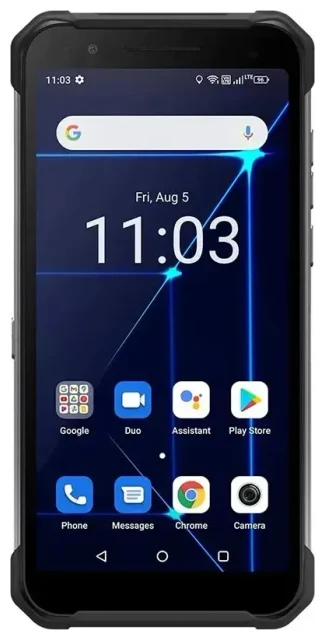
Does the Myphone Hammer Construction support eSIM?
No, the Myphone Hammer Construction does not support eSIM technology. This rugged device relies exclusively on traditional physical SIM cards for cellular connectivity. The Myphone Hammer Construction is designed as a durable, budget-friendly phone built for harsh work environments, and eSIM capability was not included in its feature set.
Myphone Hammer Construction eSIM compatibility
The Hammer Construction uses a standard nano-SIM card slot. It supports dual SIM functionality with two physical nano-SIM cards, allowing you to use two different phone numbers or carriers simultaneously. This dual physical SIM setup is common in rugged and entry-level devices where keeping costs down and maximizing physical durability are priorities over implementing eSIM technology.
If you specifically need eSIM capability for international travel or carrier flexibility, you'll need to consider a different device. You can check another device's eSIM compatibility to find a phone that meets your connectivity requirements.
Your options without eSIM on the Myphone Hammer Construction
Since the Myphone Hammer Construction doesn't support eSIM, you'll work with physical SIM cards for all your connectivity needs. The dual nano-SIM slots give you flexibility to manage two carriers or numbers at once, which can be useful for separating work and personal lines or using a local carrier when traveling.
Set up physical SIM cards in your Hammer Construction
- Power off your Myphone Hammer Construction completely before handling SIM cards.
- Locate the SIM tray on the side of the device and use the included SIM ejector tool or a paperclip to open it.
- Place your nano-SIM card(s) in the appropriate slots, ensuring the gold contacts face down and the notched corner aligns correctly.
- Reinsert the tray carefully, making sure it's fully seated and flush with the device body.
- Power on the phone and wait for it to detect the SIM card(s).
- Enter your PIN if prompted, then navigate to Settings to configure which SIM you want to use for calls, texts, and mobile data.
- If using dual SIMs, label each line (SIM 1 and SIM 2) so you can easily identify which carrier or number you're using.
Managing dual physical SIMs
The Hammer Construction allows you to choose which SIM handles data, calls, and messages independently. Go to Settings, then SIM cards or Dual SIM settings to configure your preferences. You can set one SIM as your primary data line while keeping the other active for voice calls and texts.
Using a travel SIM on the Myphone Hammer Construction
When traveling internationally with your Myphone Hammer Construction, you'll need a physical travel SIM card rather than an eSIM. Purchase a local prepaid SIM card at your destination airport, convenience store, or mobile carrier shop. This approach helps you avoid expensive roaming charges from your home carrier while giving you local rates for data and calls.
Getting connected abroad without eSIM
Before you fly, decide whether you want to swap your home SIM for a travel SIM or use the second SIM slot if you have dual SIM capability. If you're replacing your home SIM, make sure you have a safe place to store it during your trip. Local SIM cards typically require you to show your passport for registration and activation, and they're usually rechargeable with top-up cards or mobile apps.
If you travel frequently and want the convenience of activating connectivity before departure, consider devices that do support eSIM for future upgrades. Browse eSIM-capable phones and browse eSIM plans to see how digital connectivity can simplify international travel.
Tips & troubleshooting
Even without eSIM support, you can optimize your Myphone Hammer Construction for reliable connectivity. Understanding how to manage physical SIM cards and dual SIM settings will help you get the most from this rugged device.
Enable data roaming for international use
If you're keeping your home SIM active while traveling, you'll need to turn on data roaming in Settings under Mobile Networks or Cellular Data. Be aware that roaming charges can be expensive, so confirm your carrier's international rates before enabling this feature. With a local travel SIM, you won't need to worry about roaming fees since you're using a domestic network at your destination.
Keep your home number active for calls and verification codes
If you're using the dual SIM feature with a travel SIM in the second slot, keep your home SIM installed so you can receive important calls and two-factor authentication codes. Configure the travel SIM as your data line while leaving your home SIM available for voice and SMS. This setup gives you local data rates without losing access to your primary number.
What to do if your SIM isn't recognized
If your Hammer Construction doesn't detect a SIM card, power off the device and reseat the card, making sure it's properly aligned in the tray. Check that you're using a nano-SIM rather than a micro or standard SIM. If the SIM still isn't recognized, try it in another device to rule out a faulty card. For persistent issues, contact your carrier or visit eSIM setup help for general connectivity troubleshooting guidance.
Consider eSIM-capable alternatives for your next device
While the myphone hammer construction esim capability isn't available, many modern smartphones now include this technology. If you frequently travel internationally or want the flexibility to switch carriers digitally, keep eSIM support in mind when choosing your next phone. The Myphone Hammer Construction remains an excellent choice for durability and simplicity, but eSIM-enabled devices offer additional connectivity options for specific use cases.








