 WhatsApp +44 7367 063273
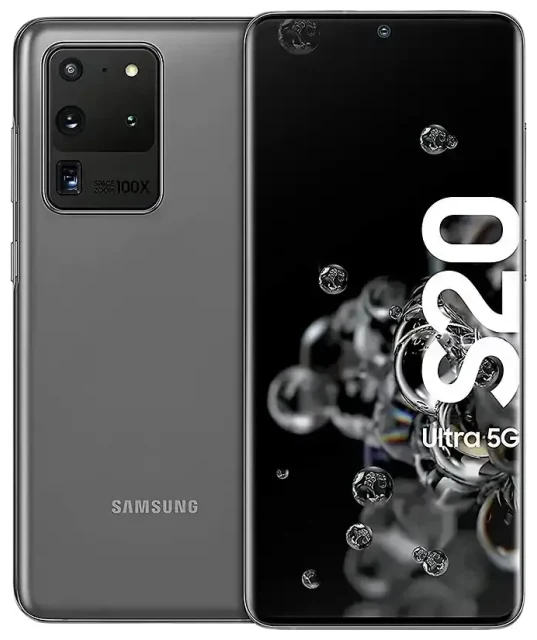
Does the Samsung Galaxy S20 Ultra 5G support eSIM?
Samsung Galaxy S20 Ultra 5G eSIM compatibility
The Samsung Galaxy S20 Ultra 5G has partial eSIM support — compatibility depends entirely on your specific model and the region where it was purchased. Most North American variants (including those sold in the United States and Canada) do not support eSIM and rely solely on a physical nano-SIM card. However, certain international models, particularly those sold in Europe, Asia-Pacific, and select other markets, do include eSIM functionality.
To determine if your Samsung Galaxy S20 Ultra 5G supports eSIM, check your model number in Settings > About phone > Model number. Look for variants like SM-G988B/DS (international dual-SIM) or SM-G988U1 (U.S. unlocked). If you're uncertain about your specific model's capabilities, verify directly on Samsung's official specification sheet for your region or contact Samsung support — eSIM support varies significantly across S20 Ultra 5G variants.
Dual SIM capabilities on compatible models
Compatible Samsung Galaxy S20 Ultra 5G models support dual SIM: one physical nano-SIM plus one eSIM profile active simultaneously. This setup lets you maintain your primary number on the physical SIM while adding a second line via eSIM — ideal for separating work and personal calls or adding a travel data plan without swapping your main SIM card.
How to set up an eSIM on the Samsung Galaxy S20 Ultra 5G
Activate an eSIM profile in Settings
If your Samsung Galaxy S20 Ultra 5G model supports eSIM, activation takes about 60 seconds. You'll need a QR code from your eSIM provider, a stable Wi-Fi connection, and confirmation that your device is carrier-unlocked (locked devices may restrict eSIM activation).
- Connect your Samsung Galaxy S20 Ultra 5G to Wi-Fi.
- Open Settings and tap Connections.
- Tap SIM card manager (or SIM manager, depending on your software version).
- Tap Add mobile plan or Add eSIM.
- Tap Scan carrier QR code and point your camera at the QR code provided by your eSIM provider.
- Confirm the plan details and tap Add.
- Wait while the eSIM profile downloads and installs (typically 30–60 seconds).
- Once installed, label your eSIM line (e.g., "Travel" or "Work") to distinguish it from your physical SIM.
- Choose which SIM to use for mobile data, calls, and texts in SIM card manager.
Set up an eSIM before your trip
You can install your eSIM profile before you travel, even while still at home. The eSIM won't connect or incur charges until you enable mobile data for that line and arrive in your destination country. Install it a day or two early to troubleshoot any issues while you still have reliable internet access.
Using a travel eSIM on the Samsung Galaxy S20 Ultra 5G
A travel eSIM gives you local data rates abroad without paying international roaming fees from your home carrier. Instead of hunting for a physical SIM card at the airport or dealing with your carrier's expensive roaming packages, you install a digital eSIM plan before you fly and arrive with data ready to go.
Purchase your travel eSIM online, receive a QR code by email, and scan it following the setup steps above. Your eSIM activates automatically when you land and turn on mobile data for that line. Keep your home physical SIM installed for incoming calls and two-factor authentication texts — the dual SIM setup means you stay reachable on your regular number while using affordable local data on the eSIM. Browse eSIM plans for your destination and compare data allowances before your trip.
Install your eSIM profile before departure
Don't wait until you're at the airport or already abroad. Install your travel eSIM while you're still home with reliable Wi-Fi, then simply toggle on mobile data for that line when you land. This eliminates scrambling for connectivity in an unfamiliar airport or troubleshooting activation issues without internet access.
Tips & troubleshooting
Enable data roaming for your eSIM line
Your Samsung Galaxy S20 Ultra 5G requires data roaming turned on for the eSIM line to connect abroad. Go to Settings > Connections > Mobile networks, select your eSIM line, and toggle Data roaming on. This setting does not apply roaming charges from your home carrier — it simply allows the eSIM to connect to local networks in your destination. Keep data roaming off for your home physical SIM if you want to avoid accidental roaming fees on that line.
Keep your home SIM active for calls and texts
Leave your primary physical SIM installed and set it as your default line for calls and SMS. This way, you'll receive two-factor authentication codes, phone calls from home, and text messages on your regular number while using the eSIM exclusively for data. Adjust these preferences in Settings > Connections > SIM card manager by tapping each category (Calls, Text messages, Mobile data) and selecting the appropriate SIM.
Fix an eSIM that won't activate
If your QR code won't scan, check that your camera lens is clean and you're scanning in good lighting. Alternatively, most eSIM providers include a manual activation code — in the Add eSIM screen, tap "Enter activation code manually" and type the code string instead. If the eSIM profile installs but won't connect, verify that your device is carrier-unlocked, restart your phone, and confirm you've enabled data roaming for the eSIM line. If you continue having trouble, eSIM setup help can walk you through additional troubleshooting steps.
Verify eSIM support on your specific model
Because eSIM availability varies across Samsung Galaxy S20 Ultra 5G variants, double-check your exact model number before purchasing an eSIM plan. North American models typically lack eSIM support, while many international versions include it. If you're still unsure after checking your model number, check another device's eSIM compatibility or consult Samsung's official specifications for your region to confirm before committing to an eSIM purchase.








