 WhatsApp +44 7367 063273
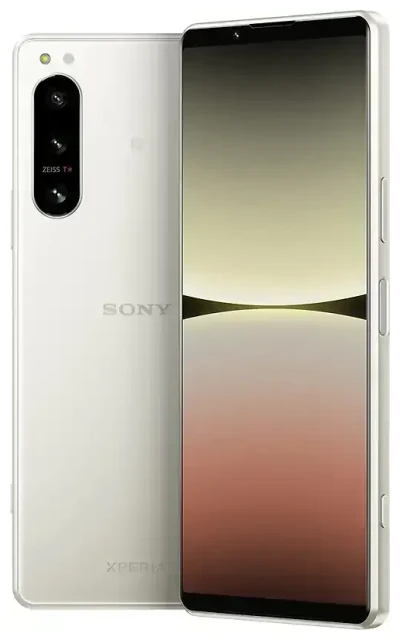
Does the Sony Xperia 5 IV support eSIM?
Yes, the Sony Xperia 5 IV supports eSIM in most global variants. Sony included eSIM functionality in this model, making it easier to use multiple mobile plans without swapping physical SIM cards.
Sony Xperia 5 IV eSIM compatibility by region
The eSIM feature is available in the majority of Sony Xperia 5 IV units sold worldwide, including models distributed in Europe, Asia, and many other markets. However, some region-specific variants—particularly certain carrier-locked versions or models sold in markets with different regulatory requirements—may not include eSIM support. If you purchased your Xperia 5 IV through a mobile carrier, confirm eSIM availability with that carrier or check Sony's official specification sheet for your exact model number.
Dual SIM capability: eSIM and physical SIM
The Sony Xperia 5 IV offers dual SIM functionality by combining one physical nano-SIM slot with one eSIM. You can use both simultaneously, which means you can keep your home number active on the physical SIM while adding a travel eSIM for data abroad, or run two different plans side by side. The device does not support dual eSIM—you'll always need the physical SIM card installed if you want to use two lines at once.
How to set up an eSIM on the Sony Xperia 5 IV
Setting up an eSIM on your Sony Xperia 5 IV takes about 60 seconds once you have your QR code from your carrier or eSIM provider. The process happens entirely in your phone's Settings app.
Step-by-step eSIM activation
- Connect your Sony Xperia 5 IV to Wi-Fi or ensure you have mobile data on your primary SIM.
- Open Settings and tap Network & internet.
- Tap SIMs, then select Add mobile plan or Download a SIM instead? (wording varies by Android version).
- When prompted, tap Next and scan the QR code provided by your eSIM provider using your phone's camera.
- Wait while the eSIM profile downloads and installs—this typically takes 30 to 60 seconds.
- Once installed, give your eSIM a label (e.g., "Travel" or "Work") to distinguish it from your physical SIM.
- Choose which SIM to use for mobile data, calls, and SMS in the SIM settings. You can switch these defaults anytime.
Manual eSIM entry if the QR code won't scan
If your camera can't read the QR code, look for an option to Enter activation code manually in the same menu. Your eSIM provider will supply the SM-DP+ address and activation code you need to type in.
Using a travel eSIM on the Sony Xperia 5 IV
A travel eSIM is the easiest way to get mobile data abroad without paying roaming fees. Instead of hunting for a local SIM card at the airport or relying on expensive roaming from your home carrier, you install an eSIM before you leave and land with data ready to go.
Install your travel eSIM before departure
Download and install your travel eSIM while you're still at home on Wi-Fi. The profile sits dormant on your Xperia 5 IV until you arrive in your destination country and turn it on. You can browse eSIM plans by country or region, buy the data package that fits your trip, and receive the QR code by email instantly. Once you land, switch mobile data to the travel eSIM line in your SIM settings, and you're online.
Your physical SIM stays in the phone, so you can still receive calls and text messages on your regular number. Many travellers set their home SIM to calls and SMS only, and route all data through the travel eSIM to avoid surprise charges.
Tips and troubleshooting
Most eSIM installations on the Sony Xperia 5 IV work smoothly, but a few settings adjustments can save you headaches if something doesn't connect right away.
Turn on data roaming for your eSIM line
Even though you're using a local or regional eSIM, Android still treats it as a separate line, and data roaming must be enabled for that SIM profile. Go to Settings > Network & internet > SIMs, tap your eSIM, and toggle Roaming on. This is normal and won't trigger roaming fees—the eSIM plan is designed for the country you're visiting.
Keep your home SIM active for calls and two-factor authentication
Leave your physical SIM installed and turned on so you can receive verification codes and phone calls. In your SIM settings, assign Calls and SMS to your home SIM, and set Mobile data to your travel eSIM. This dual SIM setup gives you the best of both worlds.
Fix an eSIM that won't activate
If the eSIM profile downloads but won't connect, restart your Sony Xperia 5 IV and wait a few minutes for the network to register. Check that the correct SIM is selected for mobile data, and confirm that data roaming is on for the eSIM line. If the QR code won't scan at all, try increasing screen brightness on the device displaying the code, or ask your provider for manual activation details. You can also get eSIM setup help if you're stuck.
Check compatibility for other Sony Xperia models
Not all Sony Xperia phones include eSIM. The Xperia 5 V, released after the Xperia 5 IV, continues eSIM support, while older models like the Xperia 5 II and Xperia 5 III do not. The flagship Xperia 1 IV also supports eSIM in most variants. If you're considering a different Sony device or want to confirm support for another brand, you can check another device's eSIM compatibility before you buy a plan.








