 WhatsApp +44 7367 063273
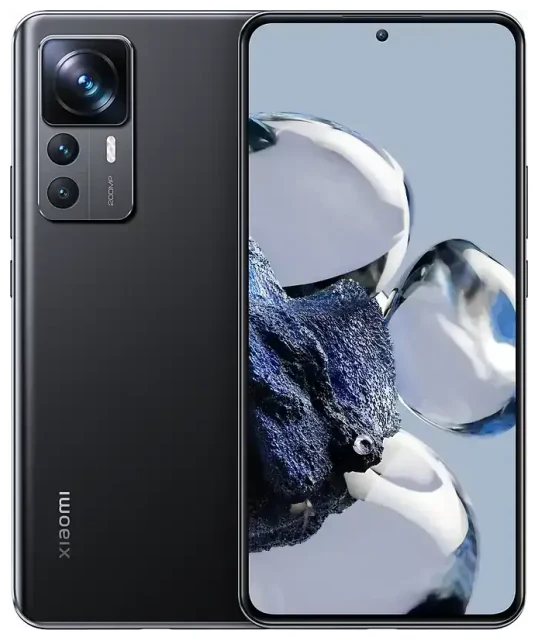
Does the Xiaomi 12T Pro support eSIM?
No, the Xiaomi 12T Pro does not support eSIM. This device relies exclusively on physical nano-SIM cards for cellular connectivity. All regional variants of the Xiaomi 12T Pro—including models sold in Europe, Asia, and other markets—lack the embedded eSIM chip required for digital SIM profiles.
Xiaomi 12T Pro eSIM compatibility
The Xiaomi 12T Pro offers dual SIM capability, but both slots require physical nano-SIM cards. You cannot convert either slot to eSIM functionality through software updates or HyperOS upgrades. When searching for Xiaomi 12T Pro eSIM activation guides or checking compatibility discussions on Reddit, you'll find consistent confirmation that this model does not include eSIM hardware.
If eSIM support is important for your needs, consider Xiaomi's flagship models like the Xiaomi 13 Pro or Xiaomi 14 series, which do offer eSIM in certain regional variants. You can check another device's eSIM compatibility before purchasing to confirm the feature is available.
Your options without eSIM on the Xiaomi 12T Pro
Since the Xiaomi 12T Pro doesn't support eSIM, you'll need to use traditional physical SIM cards for all connectivity. The device has two nano-SIM slots, giving you flexibility for dual-line use with physical cards.
Using physical SIM cards on the Xiaomi 12T Pro
To set up cellular service on your Xiaomi 12T Pro:
- Power off your device completely.
- Locate the SIM tray on the side of the phone and use the ejector tool to remove it.
- Place your nano-SIM card(s) in the tray, ensuring correct orientation with the cut corner aligned.
- Reinsert the tray firmly until it clicks into place.
- Power on your device and wait for network registration.
- Go to Settings > SIM cards & mobile networks to configure which SIM handles data, calls, and messages.
- Enable mobile data and set your preferred network for each SIM slot.
Dual SIM configuration
The Xiaomi 12T Pro supports dual standby, meaning both physical SIMs remain active simultaneously. You can assign one SIM for data and another for calls, or switch between them based on coverage or cost. This setup works well for separating work and personal lines, though you'll need to physically swap cards when traveling internationally rather than simply downloading a travel eSIM profile.
Staying connected abroad on the Xiaomi 12T Pro
When traveling with the Xiaomi 12T Pro, you have two main options for cellular connectivity since eSIM isn't available on this device.
Travel SIM cards for international connectivity
Purchase a local physical SIM card at your destination, or buy a prepaid international travel SIM before departure. You'll need to physically remove your home SIM and insert the travel SIM, which means you won't be able to receive calls or texts on your primary number unless you forward them or use internet-based services.
Keep your home SIM safe while traveling—store it in your wallet or phone case. When you return, you'll swap the cards again to restore your regular service.
Consider eSIM-capable alternatives
If you travel frequently and want the convenience of instant connectivity without swapping physical cards, you might consider devices that support eSIM. Models like the iPhone 12 Pro and newer iPhones, Samsung Galaxy S21 and later, Google Pixel 4 and up, and select Xiaomi flagships offer eSIM alongside physical SIM slots. With eSIM, you can browse eSIM plans and activate international data within minutes, keeping your home SIM active for calls and messages.
The Xiaomi 13T Pro, for instance, includes eSIM support in some markets, making it easier to manage multiple lines digitally. Before purchasing any device specifically for eSIM capability, verify that your regional variant includes this feature—not all models offer it worldwide.
Tips & troubleshooting
Managing two physical SIMs
Make sure both SIM cards are properly seated in the tray—loose contact causes intermittent connection drops. In Settings > SIM cards & mobile networks, you can rename each SIM to identify them easily (like "Home" and "Work"). Set your data preference to avoid unexpected roaming charges when both SIMs are active.
When your SIM won't register
If your Xiaomi 12T Pro doesn't detect a SIM card, remove and reinsert it to ensure proper contact. Restart the device after reinsertion. Check that the SIM isn't locked to another carrier, and confirm your account is active with your provider. If you're using a travel SIM, verify it's activated and hasn't expired.
For persistent issues with physical SIM recognition or network connectivity, you can find eSIM setup help and general troubleshooting resources, though remember this device doesn't support eSIM technology. Contact Xiaomi support if hardware issues prevent SIM detection after trying multiple known-good cards.
HyperOS and SIM management
Xiaomi's HyperOS software doesn't add eSIM capability to devices lacking the necessary hardware. Software updates improve the user interface for managing dual physical SIMs but cannot enable eSIM on the 12T Pro. If you see references to HyperOS eSIM features, those apply only to compatible Xiaomi models with eSIM chips built in.








