 WhatsApp +44 7367 063273
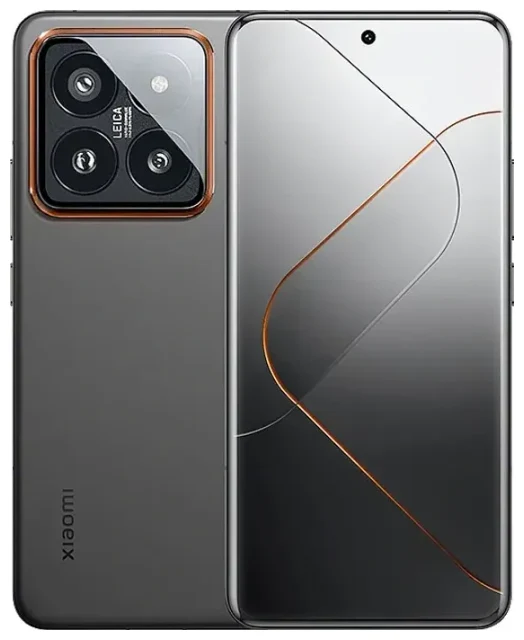
Does the Xiaomi 14 Pro support eSIM?
The Xiaomi 14 Pro supports eSIM, but only in Chinese domestic variants. If you purchased your device in mainland China, you have eSIM capability. Global and international versions of the Xiaomi 14 Pro—sold in Europe, India, Southeast Asia, and other markets—do not support eSIM and rely exclusively on dual physical nano-SIM slots.
Xiaomi 14 Pro eSIM compatibility by region
Xiaomi reserves eSIM functionality for its home market. The Chinese Xiaomi 14 Pro offers dual SIM capability through one physical nano-SIM slot and one eSIM profile. You can use both simultaneously, letting you maintain two numbers or separate personal and work lines. Global variants lack the eSIM chip entirely, so you will need two physical SIM cards to use dual SIM features.
Check your device's model number in Settings → About phone. Chinese models typically carry model designators ending in "CN" or lack regional suffixes. If you bought your Xiaomi 14 Pro outside China, it almost certainly does not support eSIM. When in doubt, confirm on Xiaomi's official specification sheet for your specific regional variant before purchasing an eSIM plan.
How to set up an eSIM on the Xiaomi 14 Pro
If you own a Chinese-market Xiaomi 14 Pro with eSIM support, adding an eSIM profile takes about sixty seconds. You will need a Wi-Fi or mobile data connection, the QR code from your eSIM provider, and access to your device settings.
Set up an eSIM in Settings
- Open Settings and tap SIM cards & mobile networks.
- Select Add mobile plan or Add eSIM.
- Tap Scan QR code and point your camera at the QR code provided by your carrier or travel eSIM provider.
- Wait while the Xiaomi 14 Pro downloads and installs the eSIM profile—this usually completes in under a minute.
- Label the new line with a recognizable name like "Travel" or "Work" to distinguish it from your physical SIM.
- Choose which line to use for mobile data, calls, and SMS in the SIM settings menu.
Once activated, your eSIM appears alongside your physical SIM in the mobile network settings. You can toggle each line on or off, set a default for data, and assign specific contacts to either number.
Managing dual SIM on the Xiaomi 14 Pro
The Xiaomi 14 Pro lets you run one physical SIM and one eSIM concurrently. Both remain active for incoming calls and texts, but only one can use mobile data at a time. Switch your data line in Settings → SIM cards & mobile networks → select the line → toggle Mobile data.
Using a travel eSIM on the Xiaomi 14 Pro
A travel eSIM gives you mobile data abroad without roaming charges from your home carrier. Instead of hunting for a local SIM card at the airport, you install an eSIM before departure and arrive with data already active. This works only if you have a Chinese Xiaomi 14 Pro with eSIM support; global models require a physical travel SIM card.
Install before you fly
Purchase a data plan for your destination, receive the QR code by email, and scan it using the steps above. Many eSIM plans activate automatically when you land and connect to a local network, while others require you to turn on the line manually in settings. Keep your home physical SIM installed so you can still receive calls and verification codes—just disable data roaming on that line to avoid surprise charges.
You can browse eSIM plans covering single countries or multi-country regions, with validity periods from a few days to a month. Compare data allowances and coverage to match your trip length and usage habits.
Tips & troubleshooting
Most eSIM installations on the Xiaomi 14 Pro complete without issues, but a few settings adjustments ensure smooth operation.
Turn on data roaming for your eSIM line
Travel eSIMs require data roaming enabled to connect to foreign networks. Go to Settings → SIM cards & mobile networks → select your eSIM → toggle Data roaming on. Your home SIM should have roaming disabled to prevent accidental charges. The Xiaomi 14 Pro treats the eSIM as a separate line, so enabling roaming on one does not affect the other.
Keep your home SIM active for calls and authentication
Leave your physical home SIM installed and enabled for voice and SMS. Banks, email providers, and many apps send two-factor authentication codes to your home number. With dual SIM active, you receive these messages even while using the eSIM for data abroad.
What to do if the QR code won't scan
Ensure your screen brightness is high if scanning from another device, or ask your eSIM provider for manual activation codes. In Settings → SIM cards & mobile networks → Add eSIM, look for an option to enter the SM-DP+ address and activation code manually. Poor lighting, scratched camera lenses, or low-resolution QR images can prevent scanning; displaying the code on a laptop or tablet screen often helps.
If your Xiaomi 14 Pro is a global model and refuses to show any eSIM option in settings, that confirms your variant does not include eSIM hardware. You can check another device's eSIM compatibility if you are considering a different phone for travel, or use a physical travel SIM card in your current device.
Restart your Xiaomi 14 Pro after installing an eSIM if mobile data does not connect immediately. Toggle Airplane mode on and off to force the device to re-scan for networks. For persistent issues, contact your eSIM provider—they can verify whether the profile installed correctly on their end and resend activation credentials if needed. For general setup questions, visit our eSIM setup help resources.








