WhatsApp +44 7367 063273
Anna V.
Amsterdam, NL · Jun 2026
Easy setup, amazing service
Setting up the eSIM was a breeze! I received the email with the instructions almost instantly. Used it mostly in Roatan for navigation and it made everything so much easier.
63 verified reviews
Based on 63 reviews
Anna V.
Amsterdam, NL · Jun 2026
Setting up the eSIM was a breeze! I received the email with the instructions almost instantly. Used it mostly in Roatan for navigation and it made everything so much easier.
Marco D.
Rome, IT · May 2026
Getting this eSIM for my trip to Roatan was a game changer. I scanned the QR code upon arrival, and I was instantly connected. Used it for Google Maps to explore the island and share photos with friends back home. Highly recommended!
Lucas O.
São Paulo, BR · May 2026
I landed in Tegucigalpa and was online within minutes! Scanned the QR code, and I was good to go. Used Google Maps to navigate and kept in touch with friends via group chat. Highly recommend!
Olivia P.
Austin, US · May 2026
Connected right away in San Pedro Sula! I used it for sharing photos and updating my travel blog. esima made my trip seamless—can't imagine traveling without it now!
Elena G.
Madrid, ES · May 2026
esima was a lifesaver while I was in Honduras! I was able to keep in touch with family and share photos without worrying about roaming fees. Installation was done in seconds, and I felt safe traveling!
Marco D.
Rome, IT · May 2026
I used esima during my week in Honduras, and it worked flawlessly. Scanned the QR code right at the airport in Tegucigalpa, and I was online in seconds. Kept me connected for Google Maps and sharing photos with friends.
Arjun K.
Bangalore, IN · Apr 2026
Using esima was a great experience in Honduras. The eSIM worked in both urban and rural areas. I just wish the email confirmation had arrived a bit quicker, but overall, it was a smooth experience.
Michael R.
Los Angeles, US · Apr 2026
I used esima while exploring the Copán Ruins and it was seamless. Scanned the QR code at the airport and was online in seconds. I used Google Maps and kept in touch with my friends without a hitch!
Typical home-carrier roaming
£10–£18
per day
Esima eSIM
£8.49
Flat rate
International roaming from most home carriers treats Honduras as a tier-two Latin American destination — you pay a flat daily rate that unlocks a capped data pool, typically throttled after the first gigabyte or two. Hotspot is often blocked or costs extra, and the daily charge applies even if you only check email once.
An esima eSIM gives you the full data allowance you purchase at local prepaid rates, with no throttling and hotspot enabled from install.
Roaming bundles from major networks also lock you to a single carrier — usually Claro or Tigo, whichever has the wholesale agreement — so you miss the automatic handoff that gives you the stronger tower in West End versus Coxen Hole.
The eSIM keeps cost predictable: you pay once, use what you need, and avoid the daily-charge creep that turns a week-long dive trip into a high roaming bill.
Different trip, same eSIM — here is how it lands for the most common visitors to Honduras.
You are coordinating a week-long dive trip across Roatán and Utila — booking boat slots, tracking weather, and staying in WhatsApp groups with your dive school. The eSIM keeps you online in West End's boardwalk bars and Utila town's hostels, with hotspot enabled so your travel partner can check flight changes on their tablet. You download reef-site videos over hotel Wi-Fi before each morning departure, knowing the outer cays have no signal.
Dive-trip planner
You fly into San Pedro Sula, hire a driver to Copán Ruinas, and spend two days exploring the Mayan site. The eSIM gives you 3G for maps and ride-hail tracking through the mainland, then switches to 4G when you return to the city for your onward flight. You share your location with your hotel during the drive and download offline maps before heading into the ruins, where signal thins out.
Copán archaeology visitor
You dock in Roatán for eight hours, rent a scooter, and ride from Coxen Hole to West Bay. The eSIM connects you to 4G across the island's resort zones, so you can navigate to the beach, check the ship's departure time, and upload photos from the Mesoamerican Reef snorkel stop. No need to hunt for a SIM kiosk or rely on the ship's expensive Wi-Fi package.
Cruise-ship day-tripper
The apps locals and travelers actually use — the ones that need real cell data, not just hotel Wi-Fi.
Google Maps
Live navigation in Tegucigalpa, San Pedro Sula, and the Bay Islands — street addresses are inconsistent.

Primary communication tool for dive schools, hotels, and airport transfers — most operators coordinate via group chats.

Uber
Ride-hail in Tegucigalpa and San Pedro Sula — patchy coverage, but safer than street taxis in elevated-advisory zones.

Windy
Weather and wind forecasts for dive planning in Roatán and Utila — reef conditions change fast.

Maps.me
Offline maps for Copán Ruinas and Lake Yojoa — download over Wi-Fi before leaving the city.

XE Currency
Live exchange rates for HNL to your home currency — useful at markets and smaller dive shops.
~40MB per day for chats and voice calls; ~120MB per day if you are in dive-school group chats with photo and video updates.
Maps
~25MB per day for live navigation in Tegucigalpa or San Pedro Sula; ~15MB per day on Roatán if you download an offline map first.
Rideshare
~5MB per ride for Uber in Tegucigalpa or San Pedro Sula, including live tracking and driver messaging.
Hurricane season runs June through November, with September and October seeing the highest risk. Claro and Tigo networks occasionally experience outages during tropical storms, particularly on the Bay Islands where infrastructure is exposed.
Download offline maps, dive-site briefings, and emergency contacts before a storm forecast. Roatán and Utila see cruise-ship surges from December through March, which can slow 4G speeds in West End and West Bay during peak disembarkation hours — early mornings and late afternoons are quieter for data-heavy tasks.
Yes, but expect 3G-mostly coverage from both Claro and Tigo. The ruins themselves and the town center have basic signal for maps and WhatsApp, but speeds are slower than the Bay Islands. Download offline maps and any large files over hotel Wi-Fi before heading out for the day.
Signal is patchy once you leave West End or West Bay. Some operators at Mary's Place and the Mesoamerican Reef sites offer on-boat Wi-Fi, but do not rely on it. Download dive-site briefings, charts, and offline maps before departure. The eSIM works fine on land — the boardwalk, dive shops, and beachfront all have 4G.
Plan for one to two gigabytes if you are using WhatsApp for dive-school updates, checking weather, and light browsing. Utila town has 4G, but the outer cays do not — download videos and maps over hotel Wi-Fi. If you are working remotely between dives or video-calling home, add another gigabyte per week.
Yes, but coverage is patchy. Uber operates in Tegucigalpa and San Pedro Sula, though the network is smaller than in other Central American capitals. The eSIM keeps you visible to the driver and lets you share your location with your hotel. Pre-booked airport transfers are often more reliable for first-time visitors.
Yes. WhatsApp voice and video calls work over 4G in Roatán, Utila town, Tegucigalpa, and San Pedro Sula. Expect lower quality on 3G in Copán Ruinas and Lake Yojoa. Most dive schools and hotels coordinate via WhatsApp groups, so keep the app updated before you arrive.
Both carriers deliver full 4G across West End and West Bay. The eSIM switches between them automatically, so you get the stronger tower at your hotel or dive shop without manual selection. In practice, coverage is nearly identical in the resort zones — the difference shows up in rural mainland areas, not on Roatán.
Yes, but expect 3G-mostly coverage from Claro and Tigo. The lake and surrounding lodges have basic signal for maps and messaging, but speeds are slower than the cities or islands. Download offline maps and any media over hotel Wi-Fi before heading out for birdwatching or hiking.
Yes. Hotspot is enabled from install, so you can tether a laptop or tablet over 4G in West End, West Bay, or Coxen Hole. Speeds are typically fast enough for email, light browsing, and video calls. If you are uploading dive photos or working with large files, hotel Wi-Fi is faster.
Signal is patchy once you leave the La Ceiba port. Some stretches of the crossing have 4G from Claro or Tigo, but expect dropouts mid-journey. Download offline maps, entertainment, and any dive-school briefings before boarding. Signal returns once you approach Coxen Hole on Roatán.
The eSIM installs before you land, so you are online at baggage claim without a counter visit. Airport SIM kiosks in Tegucigalpa and Roatán often charge tourist rates and require a passport photocopy. The eSIM locks in the price you see at purchase, switches between Claro and Tigo automatically, and includes hotspot from the first gigabyte. If you are transiting quickly to the islands, the eSIM saves time.
Roughly twenty to forty megabytes for a full day of live navigation, depending on how often you reroute. Tegucigalpa has 4G across the airport and downtown, so Maps loads quickly. Download an offline map of the city before you arrive to cut data use and keep navigation working in areas with weaker signal.
Yes. Both Claro and Tigo deliver 4G across the airport, industrial zones, and hotel areas. Most travelers transit through San Pedro Sula en route to Copán or the islands. Security advisories are elevated in certain neighborhoods — keep the eSIM active for ride-hail tracking and location sharing with your hotel or travel partner.
Yes. The eSIM profile stays dormant in your phone after the data expires. Log into your esima account, purchase a top-up for Honduras, and the profile reactivates without reinstalling. This works even if months or years pass between visits — no need to scan a new QR code.
Coverage is patchy. Utila town has 4G from both carriers, but the outer cays and remote dive sites often have no signal. Dive schools brief on Mesoamerican Reef conditions with downloaded videos. If you need to stay reachable during surface intervals, tell your school your plan before heading out — do not rely on live data offshore.
Both carriers run on 3G-mostly in Copán Ruinas and the surrounding area. The eSIM switches between them, but the difference is minimal — expect slower speeds for maps and WhatsApp compared to the Bay Islands. Download offline maps and any large files over hotel Wi-Fi before exploring the ruins.
Going further than Honduras? These plans include Honduras plus everywhere in between.
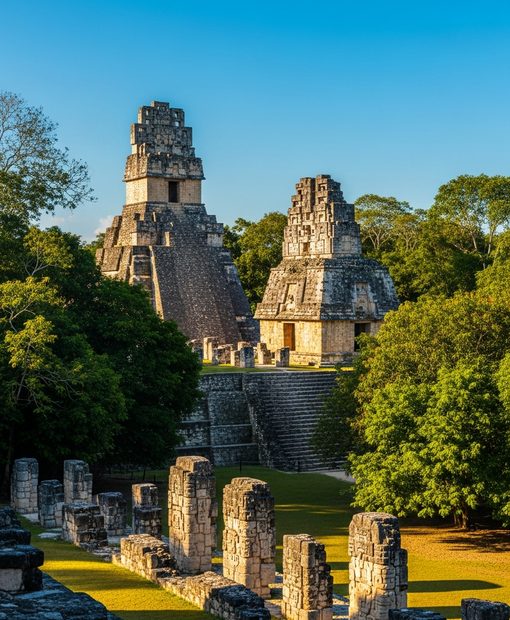

Honduras splits into two connectivity zones: the Bay Islands — Roatán, Utila — where cruise ships and dive resorts drive solid 4G in West End and West Bay, and the mainland, where you transit through Tegucigalpa or San Pedro Sula to reach Copán's Mayan ruins on patchy 3G. A Honduras eSIM connects you to Claro or Tigo the moment you land, so you can track your ride-hail out of the airport, download dive-site briefings before the boat leaves, and keep WhatsApp open without hunting for a SIM kiosk in a city you will leave within two hours.
Balanced use — social, navigation & light streaming
How many travelers?
Landing in Honduras with an esima eSIM means you scan the QR code before your flight, the profile installs over airport Wi-Fi in Tegucigalpa or Roatán, and you are online before the baggage carousel starts. The eSIM registers on Claro or Tigo within thirty seconds — no counter visit, no passport photocopy, no Spanish-language form.
If you are island-bound, 4G follows you from the airport transfer through West End's dive shops and West Bay's beach clubs; if you are mainland-bound for Copán, expect 3G once you leave the San Pedro Sula metro.
The difference between this and a physical SIM from a Tigo shop is installation speed and price transparency — the local SIM requires a storefront visit and often a higher tourist rate, while the eSIM locks in the price you see at purchase.
Hotspot works from the first gigabyte, so you can tether a laptop in your Roatán Airbnb or share data with a travel partner whose phone does not support eSIM. The profile stays dormant in your phone after the trip; recharge it for a future visit without reinstalling.
No reliable Uber or Bolt operates on the islands — pre-booked airport transfers and water-taxis dominate — but mainland Tegucigalpa and San Pedro Sula have patchy Uber coverage, and live data keeps you visible to the driver in areas where street addresses do not exist.
Three reasons travelers pick esima for Honduras. First: you pay local prepaid rates, not the roaming markup your home carrier charges for Central American towers — typically half the cost per gigabyte.
Second: the eSIM switches between Claro Honduras and Tigo Honduras automatically, so you get the stronger signal in West End's boardwalk bars or San Pedro Sula's industrial zone without manual network selection.
Third: hotspot is enabled from install — important if you are traveling with a laptop for remote work between dives or a partner whose phone does not support eSIM. No throttling on the first few gigabytes like some carrier bundles impose.
Your QR code lands in your inbox minutes after purchase.
Pay one upfront price — no surprise charges abroad.
Your physical SIM stays active for calls and texts.
Connect to top-rated local networks at full speed.
Real humans ready to help, any time zone, any day.
Scan once and you're online — no app, no SIM swap.
Our Honduras eSIMs run on the Claro Honduras and Tigo Honduras networks. Both carriers deliver 4G across Tegucigalpa, San Pedro Sula, Roatán (West End, West Bay, Coxen Hole), and Utila town.
Roatán is the most-visited destination thanks to cruise traffic — West End and West Bay both have full 4G, and some dive operators at Mary's Place and the Mesoamerican Reef sites offer on-boat Wi-Fi.
Utila, the cheaper dive hub, has 4G in town but patchy reach on the outer cays; dive schools brief on reef sites with downloaded videos. Mainland Copán Ruinas and Lake Yojoa run on 3G-mostly coverage — expect slower speeds for maps and ride-hail.
Security advisories are elevated for parts of Tegucigalpa and San Pedro Sula; tourists typically transit through these cities to reach the islands, with eSIM data important for tracking ride-hail pickups.
Network
Make sure your phone supports eSIM — most recent models do.
Pick a plan and pay securely. Your QR code arrives by email in minutes.
Scan the QR code, enable data roaming on arrival, and you're online.