 WhatsApp +44 7367 063273
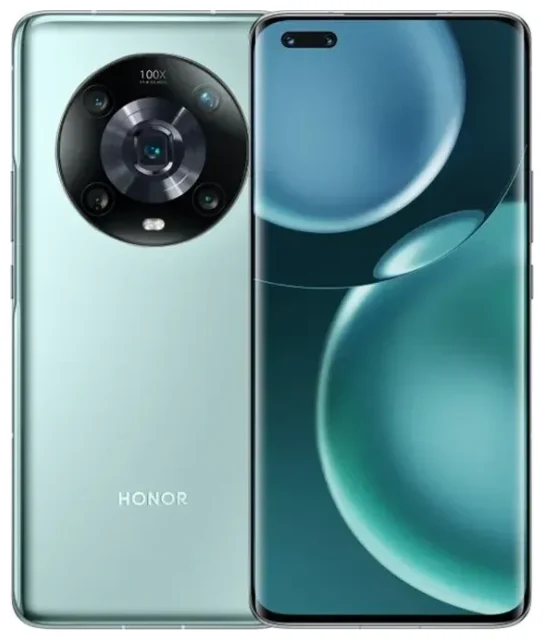
Does the Honor Magic4 Pro support eSIM?
No, the Honor Magic4 Pro does not support eSIM. This device relies exclusively on physical nano-SIM cards for cellular connectivity. All regional variants of the Magic4 Pro—including the 5G models sold in Europe, Asia, and other markets—use traditional SIM card slots rather than embedded SIM technology.
Honor Magic4 Pro eSIM compatibility
The Magic4 Pro offers dual physical SIM support, meaning you can insert two nano-SIM cards simultaneously. This dual-SIM setup allows you to maintain two phone numbers or use separate lines for personal and work calls, but neither slot accepts an eSIM profile. When checking Honor Magic4 Pro eSIM support online, you'll find that Honor has not enabled this feature on the Magic4 series, including the Magic 4 Pro 5G variant.
If you specifically need eSIM functionality, you'll need to consider other devices. Honor's eSIM support varies significantly by model and region, with some newer flagships offering the technology in select markets.
Your options without eSIM on the Honor Magic4 Pro
Since the Honor Magic4 Pro doesn't support eSIM, you'll rely on physical SIM cards for all connectivity. Here's how to make the most of your device's dual nano-SIM capability:
Using physical SIM cards on the Magic4 Pro
- Power off your Honor Magic4 Pro completely before handling the SIM tray.
- Locate the SIM tray on the left edge of the device and use the ejector tool in your phone's box to open it.
- Place your nano-SIM card(s) in the tray—the Magic4 Pro accepts two nano-SIMs in a dual-slot configuration.
- Reinsert the tray carefully, ensuring it sits flush with the device frame.
- Power on your phone and navigate to Settings > Mobile network > SIM management.
- Configure which SIM handles mobile data, calls, and messages by default.
- Label each SIM (e.g., "Personal" or "Work") to distinguish them easily in your settings.
Honor phones with eSIM capability
If eSIM technology is essential for your needs, research which Honor devices offer this feature in your region. eSIM availability on Honor phones depends heavily on the market and carrier partnerships. Always verify eSIM support on the manufacturer's official specification sheet before purchasing, as regional variants of the same model may differ. You can check another device's eSIM compatibility to compare options that match your requirements.
Staying connected abroad with the Honor Magic4 Pro
Without eSIM support, you'll need a physical travel SIM card for international connectivity on your Magic4 Pro. The good news: the device's dual-SIM setup makes this straightforward.
Travel SIM strategy for the Magic4 Pro
Purchase a local or international travel SIM card before your trip or at your destination airport. Insert it into your second SIM slot while keeping your home SIM in the first slot. In Settings > Mobile network > SIM management, designate the travel SIM for mobile data to avoid roaming charges on your home line. Your home SIM remains active for incoming calls and text messages, including two-factor authentication codes.
If you travel frequently and find swapping physical SIM cards inconvenient, consider upgrading to an eSIM-capable device. Many modern smartphones let you install travel data plans digitally, eliminating the need to purchase and insert physical cards in each country. While the Magic4 Pro can't take advantage of this technology, browse eSIM plans to understand what you'd gain from an eSIM-compatible phone on your next upgrade.
Tips & troubleshooting
Optimize dual-SIM settings for travel
When using two physical SIMs on your Honor Magic4 Pro, configure your settings carefully to avoid unexpected charges. Open Settings > Mobile network > SIM management and select which SIM handles mobile data by default. Enable data roaming only for your travel SIM—never for your home SIM unless you're prepared for potential roaming fees. Your home carrier may charge you even if data roaming is turned off, so contact them about suspending international roaming entirely during your trip.
Physical SIM troubleshooting
If your Magic4 Pro doesn't detect a newly inserted SIM card, power off the device and reseat the SIM tray. Ensure the nano-SIM sits correctly in the tray slot with the gold contacts facing down. Check that your SIM isn't locked to another carrier—contact your provider if you suspect a carrier lock. If you're having persistent connectivity issues and need guidance, visit our eSIM setup help section for general troubleshooting that applies to SIM connectivity problems.
Preparing for your next device
If you're researching whether devices like the Honor X9c support eSIM, the Honor X9d support eSIM, or the Honor Magic 8 Pro support eSIM, remember that eSIM compatibility varies widely by model, region, and carrier. Honor has been inconsistent with eSIM rollout across its product line. The Magic 4 tablet, for instance, also lacks eSIM support. Always confirm on Honor's official product specifications for your region before assuming any device includes this feature, as marketing materials don't always clarify which connectivity options are available.








