 WhatsApp +44 7367 063273
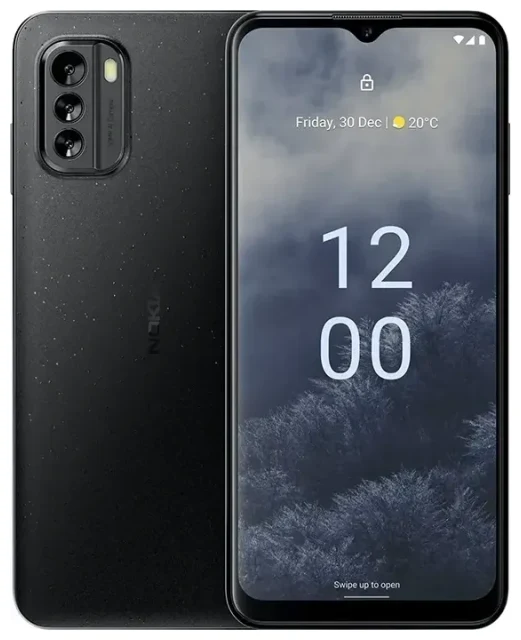
Does the Nokia G60 support eSIM?
No, the Nokia G60 does not support eSIM technology. This includes all regional variants of the Nokia G60 5G model released globally. The device relies exclusively on physical nano-SIM cards for cellular connectivity.
Nokia G60 eSIM compatibility
The Nokia G60 5G specs confirm that the phone offers dual SIM functionality, but only through two physical nano-SIM card slots. You won't find eSIM capability in any version of this model, regardless of where you purchased it or which carrier you use. If you need eSIM support for travel or work, you'll need to consider a different device or rely on physical SIM cards for now.
Physical dual SIM setup on the Nokia G60
While the Nokia G60 doesn't offer eSIM, it does give you dual standby with two physical SIMs. You can keep your primary line active in one slot while using a second SIM for travel, work, or a separate data plan. Both slots accept nano-SIM cards, and you can manage which SIM handles calls, texts, and data through the phone's settings.
Your options without eSIM on the Nokia G60
Since the Nokia G60 lacks eSIM support, you'll use traditional physical SIM cards for all connectivity needs. Here's how to make the most of what the device offers and stay connected when you travel.
Using physical SIM cards for travel
When you travel internationally with your Nokia G60, you have a straightforward option: purchase a local physical SIM card at your destination. Here's how to set it up:
- Power off your Nokia G60 before removing the SIM tray.
- Locate the SIM tray on the side of the device and use the ejection tool (or a paperclip) to open it.
- Insert your travel SIM card into the second slot, keeping your home SIM in the primary slot.
- Power on the device and wait for it to detect the new SIM.
- Go to Settings > Network & internet > SIM cards to configure which SIM handles mobile data.
- Label each SIM (e.g., "Home" and "Travel") so you can easily switch between them.
- Enable mobile data on your travel SIM and disable data roaming on your home SIM to avoid unexpected charges.
Consider eSIM-capable alternatives
If you frequently travel or need the flexibility of eSIM technology, you might want to check another device's eSIM compatibility before your next phone purchase. Newer Nokia models and many other manufacturers now include eSIM support, which eliminates the need to hunt for physical SIM cards abroad. For now, though, the Nokia G60's dual physical SIM setup remains a reliable, if slightly less convenient, solution.
Staying connected abroad with the Nokia G60
Without eSIM capability, your connectivity strategy on the Nokia G60 will look different from what eSIM users experience, but you still have practical options for international travel.
Local SIM cards at your destination
Physical SIM cards are widely available at airports, convenience stores, and mobile carrier shops in most countries. You'll typically get competitive data rates and local coverage. The main drawback is the need to physically obtain and swap SIM cards, which takes time you might prefer to spend elsewhere. Purchase your local SIM shortly after arrival, and remember to keep your ejection tool handy.
Why travelers prefer eSIM-capable devices
While this doesn't help you with the Nokia G60 specifically, understanding why eSIM technology has become popular for travel can inform your next device purchase. eSIM users can install data plans before departure, switch between providers instantly, and avoid the hassle of finding SIM vendors in unfamiliar locations. If these benefits appeal to you, consider an eSIM-compatible phone when you upgrade. You can browse eSIM plans to see what coverage and rates are available for your typical destinations.
Tips & troubleshooting
Managing connectivity on the Nokia G60 requires a few specific considerations since you're working with physical SIMs only.
Managing dual physical SIMs effectively
Keep your home SIM installed in the primary slot for calls and text messages, especially two-factor authentication codes. Use the second slot for your travel SIM and dedicate it to mobile data. In your SIM card settings, explicitly assign mobile data to your travel SIM and turn off data roaming for your home line. This prevents bill shock while ensuring you can still receive important calls and messages on your primary number.
Fix common SIM detection issues
If your Nokia G60 doesn't recognize a newly inserted SIM card, power off the device completely and reseat the SIM, ensuring it's properly aligned in the tray. Dirt or debris in the SIM slot can cause detection problems—gently blow into the slot or use compressed air if available. Some international SIM cards require you to manually enter APN settings, which you'll find under Settings > Network & internet > SIM cards > Access Point Names. Your SIM card packaging should include the correct APN details if manual configuration is needed. For additional help with connectivity setup, visit our eSIM setup help page, which also covers physical SIM troubleshooting.








