 WhatsApp +44 7367 063273
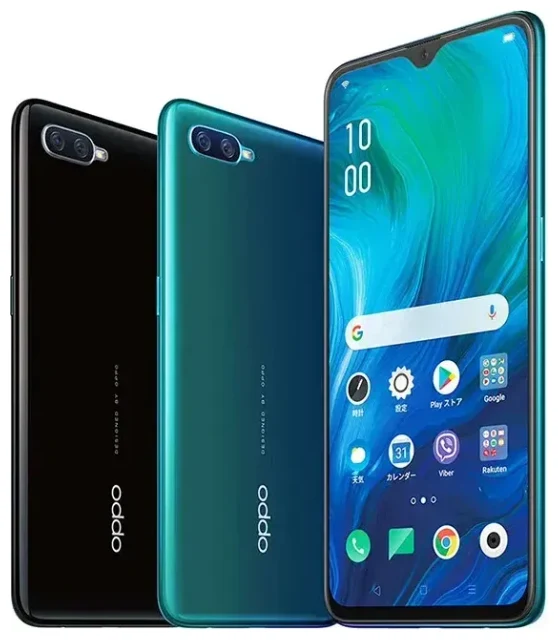
Does the OPPO Reno a support eSIM?
No, the OPPO Reno a does not support eSIM technology. This device relies exclusively on physical nano-SIM cards for cellular connectivity. Released in 2019 primarily for the Japanese market, the OPPO Reno a was designed before eSIM became widely adopted in mid-range smartphones.
OPPO Reno a eSIM compatibility
The OPPO Reno a offers dual physical SIM card slots, allowing you to use two nano-SIM cards simultaneously. This setup supports dual standby, so you can maintain two phone numbers or separate a work line from a personal line. However, neither slot accepts eSIM profiles—you'll need physical SIM cards for both slots.
If you're specifically looking for OPPO devices with eSIM capability, newer models in the Reno and Find series have started incorporating this feature in select markets. The OPPO Find X3 Pro, Find X5 Pro, and certain region-specific variants of the Reno 5 A offer eSIM support, though availability varies significantly by country and carrier partnerships.
Your options without eSIM on the OPPO Reno a
Since the OPPO Reno a doesn't support eSIM, you'll work with physical SIM cards for all your connectivity needs. The dual-SIM functionality still gives you flexibility for managing multiple lines or switching carriers.
Set up a physical SIM in the OPPO Reno a
- Power off your OPPO Reno a completely before handling the SIM tray.
- Locate the SIM tray on the left edge of the device and use the ejector tool (or a paperclip) to gently pop it out.
- Place your nano-SIM card in the tray—the tray accommodates two nano-SIMs, or one nano-SIM plus a microSD card for expandable storage.
- Reinsert the tray carefully, ensuring it sits flush with the device frame.
- Power on the device and wait 30–60 seconds for the network to register.
- Navigate to Settings > SIM Card & Mobile Data to label your SIMs, choose which one handles calls, messages, and mobile data, and configure dual-SIM preferences.
Consider eSIM-capable alternatives
If eSIM functionality is important for your workflow or travel habits, you might want to check another device's eSIM compatibility before your next upgrade. Devices like the OPPO Find X5 Pro, Reno 5 A (specific variants), and flagship models from other manufacturers increasingly offer eSIM support alongside physical SIM slots.
Using a travel SIM on the OPPO Reno a
Traveling abroad with the OPPO Reno a means you'll rely on physical SIM cards rather than digital eSIM profiles. You have two practical options: purchase a local SIM card when you arrive at your destination, or buy a prepaid international travel SIM before you leave.
Local physical SIM cards for international travel
Many travelers find local SIM cards at airports, convenience stores, or carrier shops in their destination country. This approach often delivers the best data rates for extended stays. Just make sure your OPPO Reno a is unlocked—contact your carrier if you're unsure about your device's unlock status.
Insert the local SIM in one slot while keeping your home SIM in the second slot. This configuration lets you receive calls and texts on your home number (though roaming charges may apply for incoming calls) while using affordable local data on the travel SIM. Remember to enable data roaming only for the local SIM in your dual-SIM settings to avoid unexpected charges.
If you prefer the convenience of eSIM for future trips and want to skip the hunt for physical SIM cards abroad, consider upgrading to an eSIM-compatible device. You can browse eSIM plans that install digitally within minutes, ready to activate as soon as you land.
Tips & troubleshooting
Getting the most from dual physical SIMs on the OPPO Reno a requires understanding a few settings quirks and common issues.
Manage data roaming for each SIM
When you're using two SIM cards, the OPPO Reno a lets you control data roaming independently for each line. Go to Settings > SIM Card & Mobile Data, tap each SIM, and toggle data roaming on or off. For travel, turn on roaming only for your travel SIM to prevent bill shock on your home line.
Keep your home SIM active for verification codes
Even when using a local SIM for data abroad, keep your home SIM installed in the second slot. Banking apps, social media platforms, and email services often send two-factor authentication codes to your home number. With both SIMs active, you'll receive these messages without swapping cards.
Fix a SIM that won't register
If your OPPO Reno a doesn't detect a newly inserted SIM, remove and reinsert the tray to ensure proper contact. Restart the device, then check Settings > SIM Card & Mobile Data to verify the SIM appears. If the problem persists, test the SIM card in another unlocked device to rule out a faulty card. For ongoing issues, contact eSIM setup help or your carrier's technical support.
Does Oppo Reno a support eSIM in different markets?
No variant of the OPPO Reno a supports eSIM, regardless of the market where it was sold. The device's hardware lacks the embedded SIM chip required for eSIM profiles. Regional variants may differ in storage capacity, color options, or carrier branding, but all versions rely on dual physical nano-SIM slots for connectivity.








