 WhatsApp +44 7367 063273
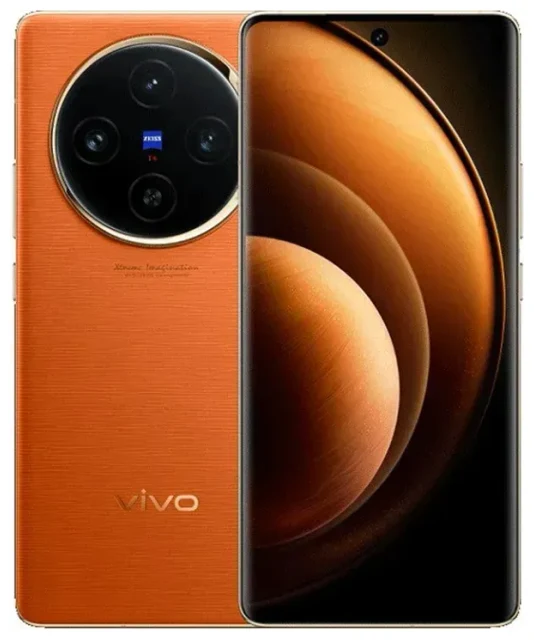
Does the vivo X100 Pro support eSIM?
The vivo X100 Pro has limited eSIM support. Chinese market models of the vivo X100 Pro include eSIM capability, but international and global variants typically do not. If you purchased your vivo X100 Pro outside mainland China—particularly in regions like India, Southeast Asia, or Europe—your device almost certainly relies on dual physical nano-SIM slots and does not support eSIM.
vivo X100 Pro eSIM compatibility by region
Vivo has restricted eSIM functionality to its domestic Chinese market for the X100 Pro. The Chinese variant supports dual SIM in a hybrid configuration: one physical nano-SIM plus one eSIM profile. This setup lets you run two numbers simultaneously, with the eSIM slot available for a secondary carrier or travel data plan.
International models—including those sold in India, Indonesia, Malaysia, and other markets—ship with dual physical SIM trays and no eSIM hardware. Because eSIM support is hardware-dependent, you cannot add it through a software update. If you own an international vivo X100 Pro, you will need to use physical SIM cards exclusively.
If you are unsure which variant you own, check your device's model number in Settings > About phone or consult the original retail packaging. When in doubt, confirm on vivo's official specification sheet for your region—never assume eSIM support without verifying your specific model.
How to set up an eSIM on the vivo X100 Pro
If you own a Chinese market vivo X100 Pro with eSIM capability, adding a new eSIM profile takes about sixty seconds. You will need a QR code from your carrier or eSIM provider, a stable Wi-Fi or mobile data connection, and access to your device settings.
Set up an eSIM in Settings
- Open Settings and tap Network & internet or SIM cards & mobile networks.
- Select Add mobile plan or eSIM.
- Tap Scan QR code and point your camera at the QR code provided by your carrier or travel eSIM service.
- Wait while the vivo X100 Pro downloads and installs the eSIM profile—this typically completes in under a minute.
- Label the new line with a recognizable name, such as "Travel Data" or "Work," to distinguish it from your physical SIM.
- Choose which line to use for mobile data, calls, and SMS in the SIM settings menu.
Once activated, your eSIM appears alongside your physical SIM in the network settings. You can toggle each line on or off, assign a default for data, and manage both numbers independently.
Manual eSIM activation codes
Some providers supply an activation code instead of a QR code. In that case, select Enter activation code manually in step three and paste the SM-DP+ address and activation code your carrier provided. The installation process remains the same.
Using a travel eSIM on the vivo X100 Pro
If your vivo X100 Pro supports eSIM, a travel eSIM offers the easiest way to stay connected abroad without paying international roaming fees. You keep your primary number active for calls and messages while routing data through a local eSIM plan tailored to your destination.
Install before you fly
Purchase and install your travel eSIM before departure. Most eSIM plans activate only when you land and connect to the destination network, so installing early ensures you have data the moment you disembark. Browse browse eSIM plans to compare coverage and data allowances for your trip.
After installation, set the travel eSIM as your default mobile data line in SIM cards & mobile networks. Leave your home SIM enabled for voice and SMS so you can receive verification codes and calls without extra cost. This dual-line setup gives you affordable data abroad and reliable access to your home number.
Tips & troubleshooting
Setting up an eSIM on the vivo X100 Pro is usually straightforward, but a few common issues can interrupt activation. Here's how to resolve them and make the most of your dual-SIM configuration.
Turn on data roaming for the eSIM line
Your travel eSIM will not work abroad unless data roaming is enabled for that specific line. Go to Settings > SIM cards & mobile networks, select your eSIM, and toggle Data roaming on. Data roaming for an eSIM plan you purchased does not trigger surprise charges—you are using the prepaid allowance you already bought.
Keep the home SIM for calls and two-factor authentication
Leave your primary physical SIM active for incoming calls and text messages, especially two-factor authentication codes from your bank or email provider. Assign mobile data exclusively to the travel eSIM so you avoid roaming fees while staying reachable on your main number.
Fix an eSIM that won't activate
If the QR code won't scan, check that your camera lens is clean and the code is displayed at full brightness. Poor lighting or a cracked screen protector can prevent recognition. You can also select Enter activation code manually and type the details instead. If the profile downloads but fails to connect, restart your vivo X100 Pro and confirm you have an active internet connection during installation. For persistent issues, reach out for eSIM setup help or contact your eSIM provider directly.
Verify your variant before buying an eSIM
Because only Chinese market models support eSIM, confirm your vivo X100 Pro variant before purchasing a travel eSIM plan. If your device does not list an eSIM option in SIM cards & mobile networks, it lacks the necessary hardware. In that case, you will need a physical travel SIM card or consider an eSIM-capable device for future trips. You can check another device's eSIM compatibility to explore alternatives.








